Feedback Form Questions: 75 Examples for Product, Events, Employees, and Customers
Start collecting responses
Turn this into a shareable survey
Draft the questions, publish a clean link, and keep every response organized in FormHug.
Most feedback forms fail because they ask for “feedback” instead of asking about a specific moment. People do not know whether you want praise, complaints, ideas, bug reports, ratings, or a story about what happened.
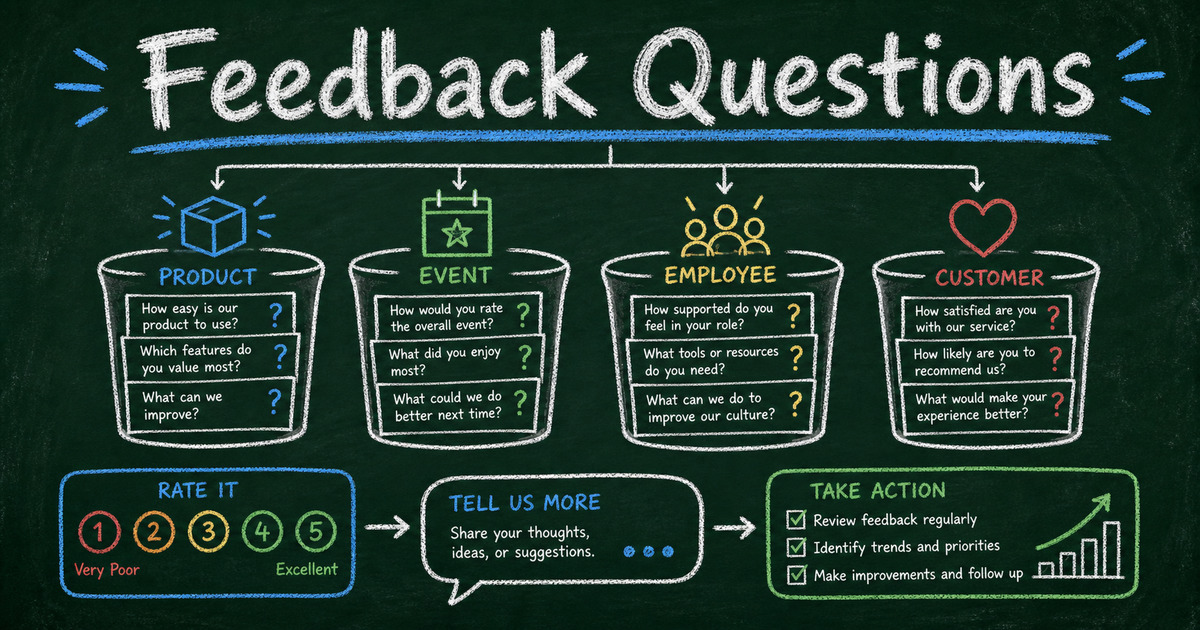
A better feedback form narrows the frame. Ask about the product they just used, the event they just attended, the support conversation they just finished, or the employee experience you can actually improve. Then use one score, one reason, and one next-action question.
This guide gives you 75 feedback form questions by use case, plus a structure for turning answers into decisions instead of a pile of comments.
TL;DR - FormHug helps you create feedback forms with ratings, open-ended questions, templates, conditional follow-ups, and shareable links.
- Ask about one moment - feedback is clearer when the form references a specific product, event, purchase, class, or support interaction.
- Use the Score -> Reason -> Action pattern - one rating, one explanation, and one improvement question are enough for many feedback forms.
- Separate feedback from research - feedback explains a lived experience; research explores a market or audience.
- Works for: product feedback, customer support, events, employee check-ins, onboarding, courses, and post-purchase follow-up.
- Keep the first version short: 3-7 questions usually beats a long form with every possible prompt.
What Are Feedback Form Questions?
Feedback form questions are prompts used to collect reactions, ratings, problems, suggestions, and improvement ideas after a specific experience. A feedback form can be as short as 3 questions or as detailed as a multi-section survey, but the goal is always the same: learn what happened and what should change.
Good feedback questions have three traits:
- They name the experience being evaluated.
- They are easy to answer without a long explanation.
- They lead to a decision, follow-up, or improvement.
“What do you think?” is weak because it gives the respondent no frame. “What nearly stopped you from finishing checkout?” is stronger because it names the moment and the kind of answer you need.
For satisfaction-specific examples, use customer satisfaction survey questions. For broader survey writing, see fun survey questions and open-ended survey questions.
The Score -> Reason -> Action Feedback Structure
Use the Score -> Reason -> Action structure when you do not know where to start.
- Score: Ask for a rating, yes/no answer, or multiple choice signal.
- Reason: Ask why they gave that answer.
- Action: Ask what would improve the experience or what should happen next.
Example:
- How satisfied were you with the onboarding session?
- What is the main reason for your score?
- What should we explain better before the next session?
This structure works because it produces both a measurable result and a usable explanation. In our testing, it also keeps feedback forms short enough to send immediately after the experience, when memory is still fresh.
For NPS-style feedback, a common scoring pattern is 0-10 with promoters at 9-10, passives at 7-8, and detractors at 0-6. For CSAT, many teams use a 1-5 scale and treat 4-5 as satisfied. Whatever scale you choose, define the score before responses arrive.
Product Feedback Form Questions
Use product feedback questions when someone has tried a feature, completed a task, tested a beta, or used a product long enough to compare expectations with reality.
- What were you trying to accomplish when you used this product?
- Were you able to complete that task?
- How easy was it to complete the task?
- What part felt confusing or slow?
- What feature did you expect to find but did not?
- What would make you use this product more often?
- Which feature is most valuable to you right now?
- Which feature could we remove without much impact?
- How does this product compare with your current alternative?
- What nearly stopped you from finishing?
- What should we improve before you recommend this to someone else?
- May we follow up about your answer?
Product feedback is most useful when tied to a task. A broad “rate the product” question can be useful for trend tracking, but it rarely tells the team what to fix next.
Ready-made starting points: Product Feedback Form Template, Customer Feedback Form Template, and Feature Request Form Template.
Customer Feedback Form Questions
Customer feedback questions work best after a specific interaction: purchase, support, onboarding, delivery, renewal, cancellation, or service completion.
- How satisfied are you with your overall experience?
- What is the main reason for your score?
- What did we do especially well?
- What should we improve first?
- Was the process easier or harder than expected?
- Did you get the outcome you needed?
- How quickly did we resolve your request?
- Was the communication clear?
- What information did you wish you had earlier?
- Would you use this service again?
- Would you recommend us to a friend or colleague?
- What would need to change before you came back?
If the form is tied to loyalty, use the NPS survey best practices structure. If it is tied to a single support or purchase experience, a CSAT question is usually clearer.
Event Feedback Form Questions
Event feedback should be sent while the experience is still fresh. For many events, that means the same day or within 24 hours. Waiting a week often turns specific observations into vague impressions.
- How satisfied were you with the event?
- What was the most valuable part of the event?
- Which session or activity should we repeat?
- Which session or activity should we change?
- Was the event length right for the topic?
- Was the location or online format easy to use?
- How clear was the pre-event communication?
- Did the event match what was promised?
- What topic should we cover next?
- Would you attend another event like this?
- Would you recommend this event to someone else?
- What should we improve before the next event?
Use an Event Feedback Form Template when you want a quick starting point. If you are still planning the event, the companion article on event registration questions can help you collect the right information before people attend.
Employee Feedback Form Questions
Employee feedback questions need extra care because people may worry about whether answers are truly safe. For sensitive topics, keep the form anonymous and avoid combinations of team, role, tenure, and location that identify a single person.
- How clear are your current priorities?
- Do you have the information needed to do your work well?
- How manageable is your workload right now?
- What is one blocker slowing you down?
- How supported do you feel by your manager or team?
- What should leadership communicate more clearly?
- What process wastes the most time?
- What tool, training, or resource would help most?
- How comfortable do you feel sharing concerns?
- What should we keep doing?
- What should we stop doing?
- What is one change that would make next month better?
For anonymous collection patterns, see anonymous survey. For training-specific feedback, use employee training quiz when you need to measure learning, not only opinions.
Onboarding, Course, and Training Feedback Questions
Use these questions when the goal is to improve a learning or onboarding experience.
- How clear was the first step?
- Which part of the onboarding or training felt most useful?
- Which part felt confusing?
- Did the pace feel too fast, too slow, or about right?
- What did you expect to learn that was not covered?
- What example or exercise helped most?
- What should we explain before the session starts?
- How confident do you feel applying what you learned?
- What question do you still have?
- Would you recommend this training to someone in a similar role?
- What should we change before the next cohort?
- May we contact you for a follow-up conversation?
If you need to test whether people retained the material, use a mini exam instead of a feedback-only form. Feedback measures experience; a quiz measures understanding.
How to Create a Feedback Form in FormHug
Step 1: Name the moment
Choose one experience to evaluate: product use, event attendance, support resolution, onboarding, purchase, training, or service delivery. Do not mix unrelated moments in the same feedback form.
Step 2: Start from a template or AI draft
Open FormHug and start with a prompt such as: “Create a 6-question feedback form for a product beta with a 1-5 rating, one task-completion question, one open-ended improvement question, and optional follow-up consent.”
You can also start with Customer Feedback Form Template, Customer Satisfaction Survey Template, or Event Feedback Form Template.
Step 3: Add one score and one explanation
Use a rating, NPS, CSAT, yes/no, or multiple choice question for the score. Then ask why they chose that answer. This gives you a trend and a reason in the same response.
Step 4: Publish where the experience ends
Send the feedback form from the place where the experience naturally ends: confirmation email, event follow-up, support closeout, onboarding message, post-purchase email, or internal announcement. A feedback form is easier to complete when the context is still present.
Frequently Asked Questions
What questions should I ask on a feedback form?
Ask one overall rating question, one reason question, and one improvement question. For example: “How satisfied were you?”, “What is the main reason for your score?”, and “What should we improve first?”
What are good customer feedback questions?
Good customer feedback questions ask about a specific experience, not the whole relationship. Ask whether the customer got the outcome they needed, what caused their score, and what would make the experience better next time.
How many questions should a feedback form have?
Most feedback forms should have 3-7 questions. Use 3 questions for quick post-experience feedback and up to 10 when you need detail for a larger product, event, or employee improvement project.
Should feedback forms be anonymous?
Anonymous feedback is useful for sensitive topics such as employee experience, workplace culture, manager feedback, or honest event criticism. Named feedback is better when you need to follow up with a customer or fix an account-specific problem.
What is the difference between feedback and a survey?
Feedback usually evaluates a specific experience. A survey is broader and may study a market, audience, behavior, or trend. A feedback form can be one type of survey, but not every survey is a feedback form.
Can I use FormHug to make a feedback form?
Yes. FormHug can generate feedback forms with AI, start from templates, add ratings and open-ended questions, publish a shareable link, and collect responses for review.
Related
- Customer Satisfaction Survey Questions - write CSAT questions for support, product, and service feedback
- Open-Ended Survey Questions - get better explanations from written answers
- NPS Survey Best Practices - use recommendation scoring without losing the reason behind the score
- Anonymous Survey - collect honest feedback when identity could change the answers
Feedback gets weaker when the question is too broad and the moment is already gone. Ask about one experience, collect one score and one reason, and make the next action clear. Create your feedback form ->

Written by
FormHug TeamProduct, research, and form automation team
The FormHug Team brings together product builders, workflow researchers, and form automation practitioners who study how people collect, route, and act on information online. Our guides are based on hands-on product testing, template analysis, customer workflow patterns, and deep experience with forms, surveys, quizzes, AI-assisted creation, integrations, and results sharing.