Ranking Survey Questions: Examples for Priorities, Preferences, and Tradeoffs
Start collecting responses
Turn this into a shareable survey
Draft the questions, publish a clean link, and keep every response organized in FormHug.
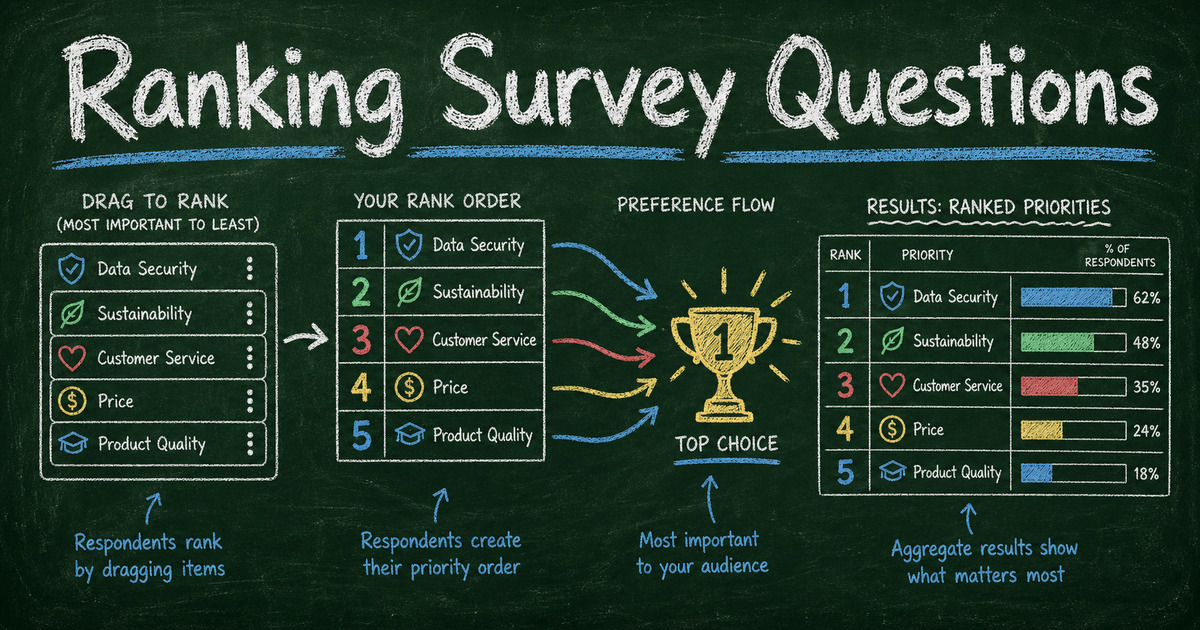
Ranking survey questions are useful because they force tradeoffs. A rating scale lets people say everything is important. A ranking question asks what matters most when only one option can be first.
That tradeoff is powerful, but it can also be tiring. Asking someone to rank 20 items is not research. It is homework. The best ranking questions use a short list, a clear decision, and answer options that belong in the same category.
This guide explains when to use ranking survey questions, when to avoid them, how to write better rank-order prompts, and how to turn ranking answers into useful decisions in FormHug.
TL;DR - Ranking survey questions ask respondents to order options by priority, preference, importance, or likelihood, which helps reveal tradeoffs that ratings can hide.
- Use ranking for tradeoffs - feature priority, topic preference, purchase criteria, event sessions, product concepts, or improvement ideas.
- Keep the list short - 4 to 7 items is easier to rank than a long list of similar options.
- Do not rank unrelated items - every option should answer the same question in the same category.
- Works for: market research, customer feedback, product planning, employee surveys, event planning, and classroom topic selection.
- FormHug can create ranking-style surveys with structured choices, follow-up questions, and shareable links.
What Are Ranking Survey Questions?
A ranking survey question asks respondents to put answer options in order. The order may represent preference, importance, priority, likelihood, or urgency.
Examples:
- Rank these product improvements from most important to least important.
- Rank these event topics by which you would most like to attend.
- Rank these purchase factors by how much they influence your decision.
- Rank these training topics by which would help your work most.
- Rank these product concepts by which you would try first.
Ranking questions are different from rating questions. A rating question asks, “How important is each item?” A ranking question asks, “Which item is more important than the others?”
That distinction matters. If respondents rate every feature as 5 out of 5, you still do not know what to build first. Ranking makes the tradeoff visible.
When to Use Ranking Questions
Use ranking when you need a priority order.
Product and feature prioritization
Ranking works well when a team has several plausible improvements and needs to know which one customers value most. Use it after you already know the list of options.
Example:
Rank these improvements from most valuable to least valuable:
- Faster setup
- More templates
- Better reporting
- More integrations
- Lower price
Market research
Ranking helps you understand purchase criteria. Instead of asking whether price, design, support, trust, and features all matter, ask respondents to order them.
For broader research workflows, pair ranking questions with the market research survey templates.
Event planning
Use ranking when choosing session topics, workshop formats, speaker themes, or follow-up activities. Ranking is better than a simple vote when you care about second and third choices too.
Employee and training surveys
Ranking can reveal which support would help most: clearer priorities, fewer meetings, better tools, coaching, documentation, or more capacity.
Classroom and student feedback
Teachers can use ranking questions to choose review topics, understand where students want more practice, or prioritize learning support options. Keep student ranking lists short so the question does not feel like another assignment.
When Not to Use Ranking Questions
Ranking questions are not always better than multiple choice or rating scales.
Avoid ranking when:
- The list has more than 7 to 8 items.
- Items do not belong to the same category.
- You need to know absolute satisfaction, not relative preference.
- Respondents may not understand every option.
- Several options can be equally important.
- The answer needs to be quick on mobile.
If several answers can be true at once, use multiple choice survey questions. If you need intensity, use Likert scale survey questions. If you need one winner, use a free poll maker.
Ranking Survey Question Examples
Product feedback ranking questions
Rank these product improvements by how much they would help you:
- Faster setup
- More templates
- More integrations
- Better reporting
- More design control
- Team collaboration
Rank these onboarding improvements from most useful to least useful:
- Shorter setup checklist
- More examples
- Guided templates
- Live support
- Better help articles
Customer research ranking questions
Rank these buying factors by importance:
- Price
- Ease of use
- Design quality
- Integrations
- Data privacy
- Customer support
Rank these reasons for choosing a tool:
- It saves time
- It is easy for respondents
- It has useful templates
- It works with our existing tools
- It looks professional
Employee survey ranking questions
Rank these changes by which would most improve your work week:
- Fewer recurring meetings
- Clearer priorities
- More focused work time
- Better documentation
- More training
- Faster access to tools
Rank these training topics by usefulness:
- AI tools
- Customer communication
- Project planning
- Data analysis
- Leadership skills
Event planning ranking questions
Rank these session topics by interest:
- Product strategy
- Customer research
- AI workflows
- Team operations
- Growth experiments
Rank these event improvements by importance:
- More networking time
- Shorter sessions
- More hands-on exercises
- Better food options
- More Q&A
Student survey ranking questions
Rank these review topics by where you want more practice:
- Vocabulary
- Writing
- Problem solving
- Group discussion
- Test preparation
Rank these learning supports by usefulness:
- More examples
- Practice quiz
- Study guide
- Office hours
- Peer review
How to Write Better Ranking Survey Questions
Rank one category at a time
Do not mix features, prices, emotions, and channels in one ranking list. If the prompt is “Rank these purchase factors,” every option should be a purchase factor.
Limit the list
Four to seven items is a strong default. If you have 15 options, split them into categories or ask a multiple choice question first: “Which of these have you considered?” Then rank only the selected options in a follow-up.
Use clear ranking direction
Tell respondents what first place means:
- Most important to least important.
- Most likely to least likely.
- Most useful to least useful.
- First choice to last choice.
Do not assume people know whether 1 means best or worst.
Avoid nearly identical options
Ranking “ease of use,” “simple setup,” and “quick onboarding” may create noise because respondents see them as overlapping. Merge similar options or define the difference.
Add one open-ended follow-up
Ranking shows order. It does not explain why. Add one optional follow-up:
“What made your top choice most important?”
That gives you context without making every respondent explain every rank.
How to Build a Ranking Survey in FormHug
Step 1: Define the decision
Write the decision first: “We need to choose the next product improvement,” or “We need to pick the event topics most likely to attract attendees.”
Ranking is strongest when the output maps directly to a decision.
Step 2: Create the ranked choice question
Open FormHug and prompt the AI builder with the decision and options:
“Create a short product prioritization survey asking customers to rank six feature improvements from most valuable to least valuable, followed by one optional question asking why their top choice matters.”
If your ranking question is part of a broader survey, start from FormHug’s survey maker or a survey and feedback template, then add the ranking-style prompt where the priority decision belongs.
Step 3: Add segmentation only if it changes the decision
Ask one segment question if the ranking should be analyzed by group: customer type, role, plan, course, location, or attendance type.
Keep segmentation broad. Ranking data becomes less useful when every segment has only a few responses.
Step 4: Review first-choice and top-three patterns
Do not look only at the average rank. Also review:
- Which option appears most often in first place.
- Which options appear most often in the top three.
- Which options are polarizing.
- Whether different segments rank priorities differently.
The top-ranked option is not always the best decision. A choice that is consistently top three across segments may be safer than one option that a small group ranks first and everyone else ranks last.
Ranking Questions vs Rating Questions
| Need | Better question type | Why |
|---|---|---|
| Choose what to build first | Ranking | Reveals tradeoffs between options. |
| Measure satisfaction level | Rating scale | Shows intensity for one experience. |
| Pick one winner | Poll or single choice | Faster than ranking. |
| Let several answers be true | Multiple select | Avoids forcing false tradeoffs. |
| Understand reasons | Open-ended follow-up | Explains the ranked choice. |
Use ranking when relative order matters. Use rating when intensity matters. Use multiple choice when categories matter. Strong surveys often combine all three, but each question should have a clear job.
Frequently Asked Questions
What is a ranking survey question?
A ranking survey question asks respondents to order answer options by preference, importance, priority, likelihood, or usefulness. It is useful when you need to understand tradeoffs between options.
How many items should a ranking question include?
Use 4 to 7 items when possible. Longer lists become tiring and less reliable, especially on mobile. If you have more options, ask respondents to choose a shortlist first, then rank that shortlist.
What is the difference between ranking and rating questions?
Ranking compares options against each other. Rating measures each option on a scale. Ranking is better for priority decisions; rating is better for satisfaction, agreement, confidence, frequency, or intensity.
Should ranking questions be required?
Only require a ranking question when every respondent can fairly compare the options. If some options may be unfamiliar, make the question optional or add “I do not know enough to rank these.”
How do I analyze ranking survey results?
Look at first-place votes, top-three frequency, average rank, and segment differences. Do not rely only on average rank, because it can hide polarizing choices.
Are ranking questions good for market research?
Yes. Ranking questions are useful for purchase criteria, product concepts, feature priorities, messaging angles, and pricing tradeoffs. Pair them with a follow-up question that asks why the top choice matters.
Can ranking questions be anonymous?
Yes. Ranking questions can be anonymous if you do not collect identifying fields. For sensitive employee or student priorities, combine ranking with the practices in the anonymous survey guide.
Can FormHug create ranking surveys?
Yes. FormHug can generate ranking-style survey drafts with AI, collect structured answers, add follow-up questions, and publish the survey by shareable link.
Related
- Free Survey Maker - create surveys with AI drafts, templates, and shareable links
- Multiple Choice Survey Questions - choose between single-select and multi-select answer options
- Likert Scale Survey Questions - measure agreement, satisfaction, frequency, and importance
- Best Market Research Survey Templates - start from research templates when ranking is part of a larger study
Ranking questions are at their best when the respondent can feel the tradeoff. Keep the list short, make first place meaningful, and use the result to choose what deserves attention first. Create your survey ->

Written by
FormHug TeamProduct, research, and form automation team
The FormHug Team brings together product builders, workflow researchers, and form automation practitioners who study how people collect, route, and act on information online. Our guides are based on hands-on product testing, template analysis, customer workflow patterns, and deep experience with forms, surveys, quizzes, AI-assisted creation, integrations, and results sharing.