How to Create a Self-Assessment Form That Employees Actually Fill Out
Create the assessment
Turn this into a scored assessment
Build an assessment with scoring, result pages, feedback, and records you can review later.
Most self-assessment forms ask employees to do two hard things at once: remember months of work and judge themselves fairly. That is why the answers often become vague, defensive, or too modest to be useful.
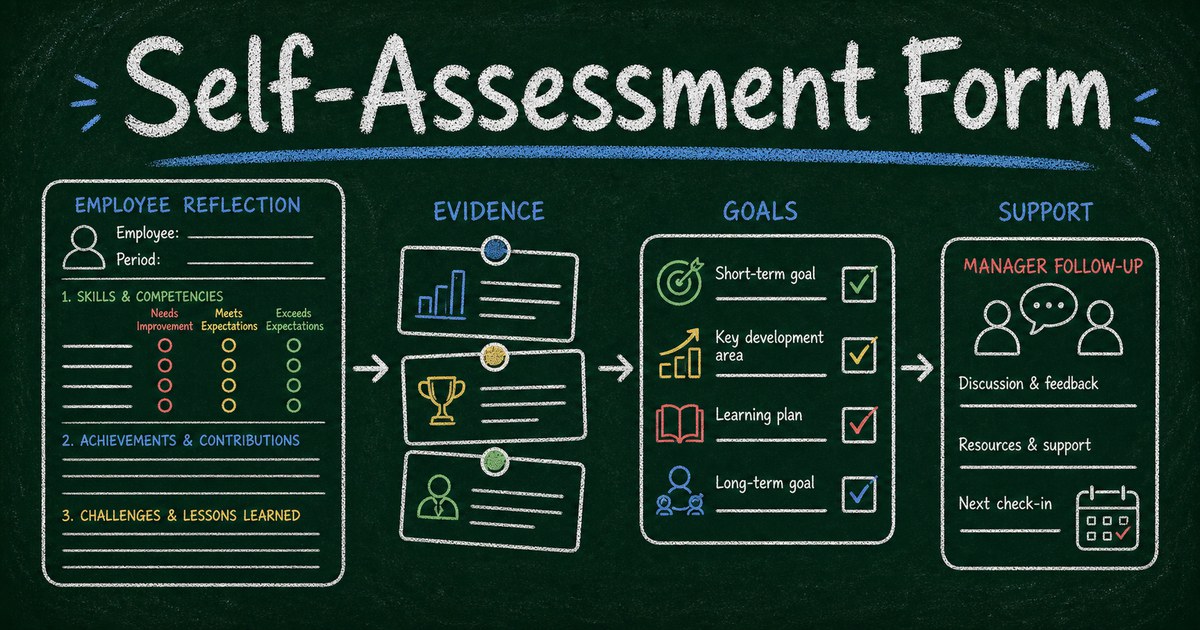
A better self-assessment form gives people structure. It asks for examples, separates outcomes from behaviors, and turns reflection into a conversation with the manager instead of a performance writing assignment.
This guide shows how to create a self-assessment form employees actually fill out, with prompts that produce useful context rather than generic annual-review paragraphs.
TL;DR - A self-assessment form helps employees reflect on outcomes, strengths, challenges, growth areas, and goals before a review or development conversation.
- Ask for evidence - examples are more useful than broad claims.
- Separate reflection from rating - employees need room to explain context.
- Keep it short - most self-assessments should take 10 to 20 minutes, not an afternoon.
- Works for: performance reviews, development planning, onboarding check-ins, coaching, and training follow-up.
- FormHug can create self-assessment forms with AI, structured sections, rating scales, and manager-ready summaries.
What Is a Self-Assessment Form?
A self-assessment form is a structured form employees complete to reflect on their work, strengths, challenges, growth areas, and goals. Managers use it to prepare for review conversations and understand context the employee may not have shared during the period.
It is not a replacement for manager feedback. It is a preparation tool.
The best self-assessments combine rating questions with evidence prompts. Ratings create structure. Examples make the rating meaningful.
The Outcome, Evidence, Learning Framework
Use three prompts for each major section:
| Prompt | What it reveals |
|---|---|
| Outcome | What did you accomplish? |
| Evidence | What example supports that? |
| Learning | What changed in how you work? |
This framework prevents the two most common self-assessment problems: vague praise and vague struggle.
Instead of asking “What are your strengths?” ask:
What is one outcome you are proud of, and what behavior helped you get there?
What to Include in a Self-Assessment Form
Use these sections:
| Section | Example prompt |
|---|---|
| Role and period | Which review period is this for? |
| Key outcomes | What are 2 to 3 accomplishments from this period? |
| Strengths | What behavior helped you be effective? |
| Challenges | Where did work feel harder than expected? |
| Collaboration | How did you support others? |
| Growth | What skill do you want to develop next? |
| Manager support | What support would help you improve? |
Keep the form focused. If employees need more than 20 minutes to complete it, they will either delay it or write less thoughtfully.
How to Create a Self-Assessment Form
Step 1: Choose the purpose
Decide whether the form is for:
- Annual performance review
- Quarterly development check-in
- New hire onboarding reflection
- Training follow-up
- Manager coaching
The purpose changes the tone. A development check-in should feel lighter than a formal review.
Step 2: Generate a first draft
Use FormHug AI with a prompt like:
Create a self-assessment form for quarterly employee development. Include accomplishments, examples, challenges, collaboration, growth goals, and manager support. Keep it under 10 questions.
In our testing, the best forms used 7 to 9 questions with a mix of short text, rating scales, and one optional long-text reflection.
Step 3: Add rating scales carefully
Ratings can help, but they can also make people defensive. Use them for specific behaviors:
- I had clear priorities this quarter.
- I asked for help when blocked.
- I communicated risks early.
- I followed through on commitments.
Avoid global ratings like “I am a high performer.” They do not produce useful manager context.
Step 4: Route results into a conversation
Send the completed self-assessment to the manager before the review. Ask the manager to identify:
- One outcome to recognize
- One context point to ask about
- One development theme
- One support action
If you need broader competency scoring, pair the self-assessment with a skills assessment template.
Self-Assessment Questions Employees Can Answer
Use questions like:
- What are 2 to 3 outcomes you are proud of from this period?
- What is one example of work that improved because of your contribution?
- What felt harder than expected, and why?
- Which skill improved most during this period?
- What feedback did you act on?
- How did you support teammates or cross-functional partners?
- What should you focus on next?
- What support would make that growth easier?
Good questions make reflection easier by asking for a concrete example.
Frequently Asked Questions
How do I make a self-assessment form for employees?
Create a short form with prompts for accomplishments, examples, challenges, collaboration, growth goals, and manager support. Use rating scales only for specific behaviors.
What should employees write in a self-assessment?
Employees should write concrete outcomes, examples of impact, challenges they faced, what they learned, and what support or growth goal matters next.
How many questions should a self-assessment form have?
Most self-assessment forms should have 7 to 10 questions. That is enough for useful reflection without making the form feel like a long essay.
Should self-assessments include ratings?
Yes, but use ratings carefully. Rate specific behaviors or conditions, then ask for examples. Avoid broad self-ratings that do not produce useful discussion.
Are self-assessments useful?
Yes, when they prepare a better conversation. They are less useful when they become the only evidence used in a review or when prompts are vague.
Is FormHug free for self-assessment forms?
Yes. You can create self-assessment forms with FormHug AI, publish them, and collect responses on the free plan.
Related
- Skills Assessment Template - measure competencies across dimensions
- 360 Feedback Form - collect peer and manager feedback around behavior
- How to Create an Evaluation Form - structure ratings and comments for better review workflows
A self-assessment should not ask employees to write their own performance mythology. Give them prompts that turn real work into useful reflection. Create your self-assessment form →

Written by
FormHug TeamProduct, research, and form automation team
The FormHug Team brings together product builders, workflow researchers, and form automation practitioners who study how people collect, route, and act on information online. Our guides are based on hands-on product testing, template analysis, customer workflow patterns, and deep experience with forms, surveys, quizzes, AI-assisted creation, integrations, and results sharing.