FormHug vs Microsoft Forms (2026): The Best Free Microsoft Forms Alternative
Compare your options
See how FormHug fits the workflow
Compare FormHug against other form builders when AI creation, quizzes, payments, templates, or agent workflows matter.
Microsoft Forms is useful when the audience already lives inside Microsoft 365. That is its strength: quick polls, classroom quizzes, internal feedback, event signups, and spreadsheet-friendly responses without leaving the Office ecosystem.
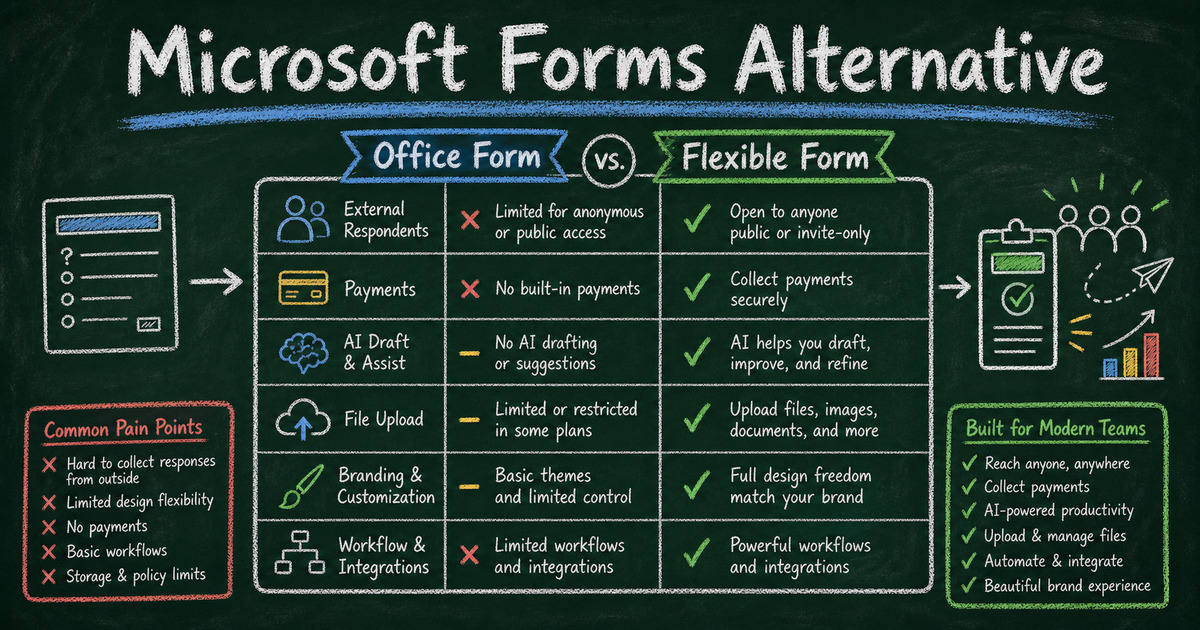
It is also the reason people outgrow it. The moment the form has to work for customers, applicants, event attendees, paid registrants, public respondents, or people outside your tenant, the Microsoft 365 assumptions start showing. The form works, but the workflow around it becomes too narrow.
This comparison uses public Microsoft documentation and common alternative-search pain points rather than private customer quotes. It is for teams that like Microsoft Forms for quick collection but need a form builder with better design, AI creation, payments, richer workflows, and public respondent experiences.
Why People Look for a Microsoft Forms Alternative
People usually do not leave Microsoft Forms because it is broken. They leave because it is too tied to the Microsoft 365 way of working.
Microsoft’s own help materials describe Forms as a way to create surveys, quizzes, and polls, with controls for internal or external response collection. That is perfect for many workplace and education scenarios. But alternative searches usually start when the form stops being an internal data-collection object and becomes part of a customer-facing workflow.
The common switch moments are concrete:
- The form needs to look like a brand, landing page, or product experience.
- The form needs payment collection for an event, class, order, donation, or deposit.
- The respondent is outside the organization and file upload, identity, or access settings become awkward.
- The team wants AI to draft a complete form, not just manually assemble fields.
- The workflow needs respondent self-service, such as checking a result, registration, placement, or submission status later.
- The form needs to connect to non-Microsoft tools or AI agents without treating Excel as the center of the workflow.
If your use case is still a simple internal survey, Microsoft Forms may be enough. If you are building something public-facing, revenue-related, review-based, or AI-assisted, FormHug is built for that wider surface.
TL;DR: FormHug vs Microsoft Forms at a Glance
| Feature | FormHug | Microsoft Forms |
|---|---|---|
| AI form creation | ✅ Natural-language form generation | ⚠️ Copilot help depends on Microsoft plan and availability |
| Best fit | Public forms, surveys, quizzes, applications, payments, bookings | Internal Microsoft 365 surveys, polls, and quizzes |
| Design and layout | ✅ Polished form design, header-driven styling, classic/card layouts | ⚠️ Basic themes and Microsoft-style layout |
| External respondents | ✅ Built for public sharing | ✅ Possible, but settings and governance depend on tenant/admin choices |
| Payment collection | ✅ Built-in payment workflows | ❌ No native payment field |
| Public lookup | ✅ Public Query lets respondents retrieve their own record | ❌ No equivalent |
| Quiz and assessment depth | ✅ Scoring, feedback, certificates, assessments | ⚠️ Good for basic quizzes |
| File upload | ✅ Designed for flexible public workflows | ⚠️ Often tied to sign-in and organization settings |
| Microsoft ecosystem | ⚠️ Exports and integrations | ✅ Strong with Excel, Teams, and Microsoft 365 |
| Free plan | ✅ Yes | ✅ Included with Microsoft account / Microsoft 365 access |
What Is Microsoft Forms?
Microsoft Forms is Microsoft’s lightweight tool for surveys, quizzes, and polls. It is commonly used by schools, businesses, and Microsoft 365 teams for quick feedback, registration, assessments, and internal data collection.
Its biggest advantage is ecosystem fit. Responses can be reviewed in Forms and exported to Excel; Microsoft 365 admins can control sharing and external response settings; Teams and education workflows can use Forms without introducing another vendor.
That ecosystem fit is valuable. It also defines the ceiling.
What Is FormHug?
FormHug is an AI form builder for public-facing and workflow-heavy forms: surveys, registration forms, quizzes, assessments, application forms, payment forms, booking forms, and respondent lookup pages.
The real advantage is not one feature name. It is that FormHug treats the form as the workflow, not just the question sheet. We built and tested the new articles in this batch around that idea: survey analysis, feedback questions, registration templates, and application forms all need structure after the response arrives.
Feature-by-Feature Comparison
External Forms and Public Respondents
Microsoft Forms can collect responses from people outside your organization when sharing is enabled. That is useful, but the experience is still governed by Microsoft 365 settings, organization policies, and identity choices. File upload and some collaboration behaviors can become especially sensitive when respondents are external.
FormHug starts from the opposite assumption: the respondent may be a customer, attendee, student, applicant, vendor, parent, donor, or visitor with no account in your ecosystem. A public form should feel natural from a phone, email, QR code, website, or campaign page.
Verdict: Microsoft Forms for Microsoft-managed audiences; FormHug for public respondents and external workflows.
Design, Branding, and Layout
Microsoft Forms has a clean, recognizable interface and enough theme options for internal use. But it still feels like a Microsoft form. That is fine for HR surveys and classroom checks. It is less ideal when the form represents a paid event, branded service, product waitlist, application process, or customer-facing lead funnel.
FormHug gives you a more polished default experience, richer visual identity, and layout choices that fit the task. A registration form can feel direct and efficient; a survey or quiz can use a more focused one-question-at-a-time experience.
Verdict: FormHug when the form is part of the brand experience.
AI Form Creation
Microsoft has added Copilot-assisted workflows across Microsoft 365, and that can help eligible users draft or refine form content. The tradeoff is availability: Copilot features depend on the plan, account type, admin controls, and rollout.
FormHug makes AI form creation the core builder experience. Describe the form in plain language, and FormHug drafts the structure, fields, and flow. In our testing, the useful difference is speed on multi-purpose forms: an application form, feedback form, quiz, or registration form can start from a complete draft instead of a blank builder.
Verdict: FormHug for AI-first form creation; Microsoft Forms for teams already paying for Microsoft 365 AI workflows.
Payments, Orders, and Paid Registration
Microsoft Forms does not have a native payment field. If you need to collect a workshop fee, class payment, event deposit, order payment, membership dues, or donation, you need another tool in the workflow.
FormHug is better suited for payment-adjacent forms because payment can live inside the form experience. That matters for paid registration especially: every extra checkout link is another place for the respondent to stop.
For payment-specific setup, see how to create a payment form and free order form templates.
Verdict: FormHug for any form that needs money to move with the submission.
Quizzes, Assessments, and Result Experiences
Microsoft Forms is genuinely useful for basic quizzes. Teachers, trainers, and internal teams can create questions, mark answers, and review results. If the goal is a simple knowledge check inside Microsoft 365, it works.
The gap appears when the quiz needs to become an experience: certificates, score-range feedback, richer assessments, result pages, or a respondent-facing record after submission. FormHug is built for quizzes and assessments that do more than mark right and wrong.
If you are building a deeper quiz, compare how to create an online quiz, mini exam questions, and how to create an online personality test or skills assessment.
Verdict: Microsoft Forms for simple quizzes; FormHug for assessments, certificates, and richer result experiences.
File Uploads and Application Workflows
File upload is one of the places where Microsoft Forms can feel simple internally and awkward externally. Microsoft 365 environments often require sign-in, storage, and admin policy decisions around uploads. That may be exactly what an IT team wants, but it can be friction for applicants, vendors, parents, or customers.
Application forms need more than upload. They need eligibility, evidence, logistics, consent, and reviewer-friendly structure. A file field alone does not make the submission easier to compare.
FormHug is a stronger fit when the form is part of a review workflow: job applications, vendor applications, grant proposals, scholarship screening, volunteer applications, and program admissions.
Verdict: Microsoft Forms for internal document collection; FormHug for external application and review workflows.
Public Query and Respondent Self-Service
This is FormHug’s clearest unique advantage. Public Query lets you publish a lookup page where a respondent enters an ID, email, name, or other allowed search field and retrieves only their own result or record.
That supports use cases Microsoft Forms is not designed for: exam results lookup, race results lookup, course results, registration confirmation, application status, and public records that must stay private per respondent.
Microsoft Forms collects responses for the form owner. It does not turn those responses into a safe respondent self-service lookup experience.
Verdict: FormHug. Microsoft Forms has no equivalent to Public Query.
Microsoft 365 Integration
This is where Microsoft Forms still wins. If your team lives in Excel, Teams, SharePoint, OneDrive, and Microsoft admin controls, Forms fits cleanly. The tool is familiar, centrally managed, and already approved in many organizations.
FormHug is better when the workflow should not revolve around Microsoft 365: public campaigns, external submissions, AI-generated forms, payments, registration, application review, quiz results, and respondent lookup.
Verdict: Microsoft Forms for Microsoft-first internal operations; FormHug for flexible public workflows.
Pricing Comparison
| Plan | FormHug | Microsoft Forms |
|---|---|---|
| Free | ✅ Free tier with core form building | ✅ Available with a Microsoft account for many consumer uses |
| Business use | Paid plans for advanced features and scale | Included in many Microsoft 365 business/education subscriptions |
| Payment support | ✅ Payment-friendly workflows | ❌ No native payment field |
| Per-response fees | None from FormHug | None from Microsoft Forms |
If your organization already pays for Microsoft 365, Microsoft Forms may feel free. The question is whether the missing workflow costs more than a dedicated form builder.
Who Should Switch to FormHug?
- Customer-facing teams that need forms to feel polished, branded, and easy for external respondents
- Event, class, and workshop organizers collecting registrations, preferences, fees, reminders, or follow-up feedback
- Teams accepting applications from job candidates, vendors, students, volunteers, grantees, or partners
- Educators and trainers building quizzes, assessments, certificates, or respondent-facing results
- Teams that need payment collection inside a form rather than a separate checkout link
- Organizations that need respondent lookup for exam results, registration confirmations, placements, or status checks
- AI-first builders who want to generate forms from natural language and reuse them across workflows
Who Should Stay on Microsoft Forms?
- Microsoft 365-first organizations where IT approval, Teams, Excel, SharePoint, and tenant policies are the main constraint
- Schools and businesses running simple quizzes or polls where the audience is already inside the Microsoft ecosystem
- Internal feedback workflows where design, payment, public sharing, and advanced respondent experiences do not matter
- Teams that need Excel as the center of the workflow and do not want another form system
Final Verdict
Microsoft Forms is a good internal collection tool. If your users are already in Microsoft 365 and the form is a quick survey, poll, quiz, or signup, staying there is reasonable.
FormHug is the better Microsoft Forms alternative when the form becomes part of a public workflow: paid registration, customer feedback, application review, branded intake, quiz results, respondent lookup, or AI-generated form creation. The difference is not simply “more features.” It is a different center of gravity.
Microsoft Forms asks: how do we collect answers inside Microsoft 365? FormHug asks: what should happen before, during, and after this person submits?
Frequently Asked Questions
What is the best Microsoft Forms alternative?
The best Microsoft Forms alternative depends on what broke. FormHug is a strong choice when you need public forms, better design, AI form creation, payment collection, application workflows, richer quizzes, or respondent lookup.
Is Microsoft Forms good for external users?
Microsoft Forms can collect external responses when sharing settings allow it. It is best for simple external surveys or signups. For customer-facing workflows, paid registration, applications, or public respondents who should not deal with Microsoft account assumptions, FormHug is usually a better fit.
Can Microsoft Forms collect payments?
No. Microsoft Forms does not include a native payment field. For paid events, classes, orders, deposits, donations, or membership dues, use a payment-capable form builder such as FormHug.
Can Microsoft Forms replace a full form builder?
It can replace a form builder for simple internal surveys, quizzes, and polls. It is less suitable when you need advanced branding, AI-generated workflows, payment collection, respondent lookup, richer assessments, or external application review.
Does FormHug work if my team uses Microsoft 365?
Yes. You can still use FormHug for public-facing forms while keeping Microsoft 365 for email, files, and internal work. Use Microsoft Forms where the Microsoft ecosystem is the point; use FormHug where the respondent workflow matters more.
Is FormHug free like Microsoft Forms?
FormHug has a free tier for creating and publishing forms. Microsoft Forms may already be included with your Microsoft account or Microsoft 365 subscription. The decision usually comes down to workflow capability, not only price.
Related
- FormHug vs Google Forms (2026) - compare FormHug with the other default free form tool
- How to Create an Online Application Form - build review-ready application workflows
- How to Create a Payment Form - collect fees, deposits, orders, and paid registration online

Written by
FormHug TeamProduct, research, and form automation team
The FormHug Team brings together product builders, workflow researchers, and form automation practitioners who study how people collect, route, and act on information online. Our guides are based on hands-on product testing, template analysis, customer workflow patterns, and deep experience with forms, surveys, quizzes, AI-assisted creation, integrations, and results sharing.