How to Create a Post-Class Quiz or Exam Form for Google Classroom
Create the assessment
Turn this into a scored assessment
Build an assessment with scoring, result pages, feedback, and records you can review later.
Google Classroom is where many teachers already organize classwork. It is good at giving students a central place to find assignments, materials, due dates, and teacher instructions.
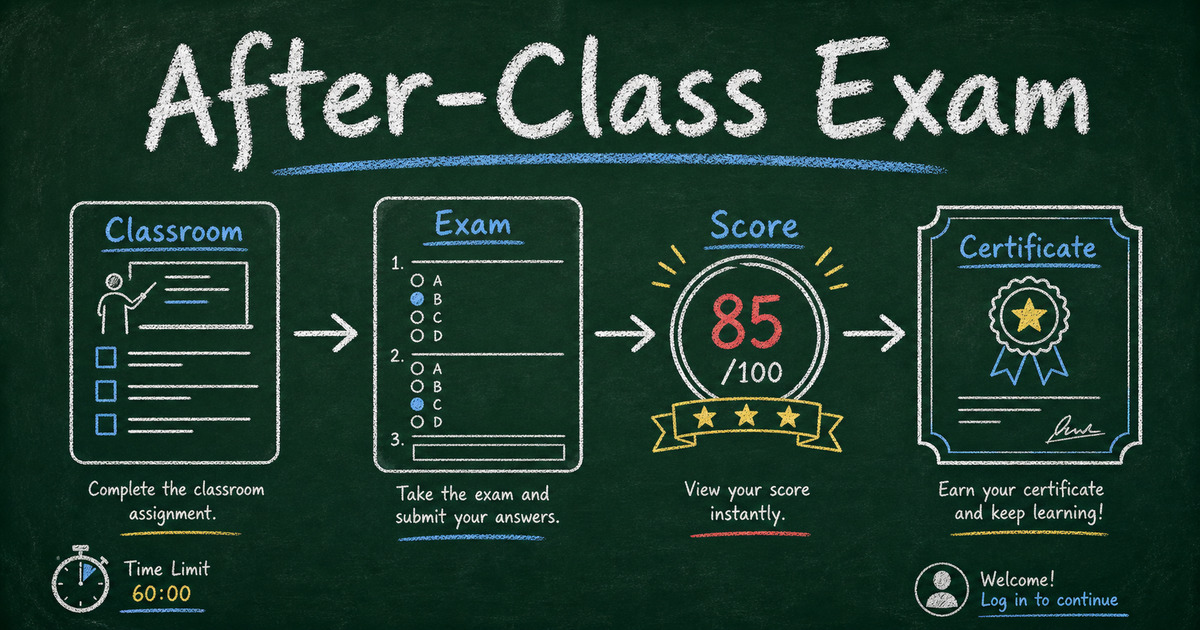
But Google Classroom quiz feedback is only useful when students can understand what happened after they submit. A post-class quiz or exam is not only a link on an assignment. It is a learning record. A student answers questions after the lesson, gets a score, reviews what they missed, and may need to find that submission again later. For teachers, the exam also needs enough structure to identify students, reduce confusion, and sometimes prove completion.
That is where an external exam form can help. You keep Google Classroom as the class hub, then share a FormHug exam link inside the assignment, material, or announcement students already check after class.
TL;DR - A post-class quiz or exam form lets teachers share a scored quiz through Google Classroom while using FormHug for login-required submissions, quiz history, time limits, anti-cheating controls, and certificates.
- Classroom stays the hub - post the exam link where students already find classwork.
- FormHug handles the exam layer - questions, scoring, answer feedback, submission records, and certificates.
- Require login for repeat quizzes - students can review previous exam attempts in My Submissions.
- Works for: lesson reviews, homework checks, unit quizzes, vocabulary tests, course completion exams, and training knowledge checks.
- Use stricter settings only when the result matters; keep practice exams lighter.
What Is a Post-Class Quiz or Exam Form?
A post-class quiz or exam form is a short online assessment students complete after a lesson, class session, module, or homework assignment. It is usually shared as a link, scored automatically, and used to check whether students understood the material while it is still fresh.
In Google Classroom, teachers can attach links and materials to assignments, questions, or announcements. Google’s Classroom help confirms that teachers can attach a link to an assignment, and its developer workflow describes the assignment life cycle as creating the assignment, sharing it with students, students completing it, students submitting it, and the teacher reviewing or grading it.
FormHug fits into that flow as the exam experience. Instead of making Classroom do everything, you use each tool for the job it is good at:
| Layer | What it handles |
|---|---|
| Google Classroom | Class organization, assignment posting, due dates, course communication |
| FormHug | Exam creation, AI question drafting, scoring, answer review, submission history, certificates |
| Student | Opens the Classroom assignment, completes the exam, reviews the submission later if needed |
This is not a replacement workflow. It is a shared workflow: Classroom distributes the exam, and FormHug runs the exam.
Why Teachers Share Quiz and Exam Forms Through Google Classroom
Google Classroom already has the audience. Students know where to look after class, and teachers do not need to introduce another channel just to send a quiz link.
That matters because post-class quizzes and exams are usually repeated. A teacher might run a five-question check after every lesson, a vocabulary quiz every Friday, a unit review before a test, or a completion exam after a short course. The more often students take exams, the more important the experience becomes.
Common classroom form scenarios include:
- A short exam after a recorded lesson.
- A homework check before the next class.
- A reading comprehension quiz.
- A vocabulary or grammar test.
- A science lab safety check.
- A course completion exam with a certificate.
- A reflective exit ticket after class.
For quick participation polls, see the fun survey questions guide. For a scored knowledge check, use an exam or quiz form instead.
How to Give Better Google Classroom Quiz Feedback
Google Classroom can distribute the quiz link, but the feedback experience should happen inside the quiz itself. Good quiz feedback tells students three things: what they answered, why the right answer is right, and what they should review next.
Use the Score -> Explanation -> Next Step feedback loop:
| Feedback layer | Student question it answers | Example |
|---|---|---|
| Score | How did I do? | ”You scored 8 out of 10.” |
| Explanation | What did I miss? | ”The correct answer is B because the main argument appears in paragraph 3.” |
| Next step | What should I review? | ”Review the vocabulary list before the next lesson.” |
This matters for Google Classroom because students often return to the assignment page after submitting. If the quiz gives only a score, the learning loop stops early. If it gives score plus explanation, the Classroom post becomes a doorway back into review rather than just a place to click a link.
Tips for Running Post-Class Exams with FormHug
Require login when students take exams more than once
Post-class work is rarely a one-time event. Students may complete a quiz every week, take several mini exams during a course, or submit multiple knowledge checks across a semester.
For that kind of workflow, require students to log in before filling out the exam. Login-required exams make each submission easier to connect to a student account, and they give students a cleaner way to find their own history later.
In FormHug, students can use My Submissions to see previous quiz information and submission records. That helps with a very practical classroom problem: students often forget whether they submitted an exam, which version they completed, or what happened on an earlier quiz.
Use login-required exams when:
- The exam is part of regular post-class homework.
- Students need to review their past quiz attempts.
- The teacher wants fewer identity-matching problems.
- The exam result may be used as a course record.
For anonymous reflection or sensitive feedback, login may not be appropriate. But for recurring post-class exams, identity and history usually matter more than anonymity.
Add a time limit when the exam needs structure
Not every quiz needs a clock. A practice review often works better when students can slow down and learn from the questions.
But time limits are useful when the exam is closer to a real assessment. They help students understand that the task should be completed in one focused sitting, and they make results easier to compare across the class.
Use a time limit for:
- Unit review exams.
- Vocabulary tests.
- Certification-style course checks.
- Reading checks where students should already know the material.
- Training exams where the score is part of completion.
Keep the time limit realistic. If the exam has 10 multiple-choice questions, a short limit may be fine. If it includes written answers, give students enough room to think.
Use anti-cheating controls only when the exam matters
Anti-cheating settings should match the stakes. A casual exit ticket does not need strict controls. A completion exam, graded unit quiz, or certificate-bearing assessment may need more structure.
FormHug can support anti-cheating controls for more formal quiz workflows. Use them when the result affects grades, course completion, certificates, or eligibility for the next module.
The practical rule is simple: if the exam is mainly for learning, keep friction low. If the exam is used as proof, add controls.
Turn on certificates for course completion
Certificates are useful when students need proof that they completed a quiz, module, workshop, or training course. They are less useful for everyday lesson checks.
For example, a teacher might skip certificates for weekly practice quizzes but enable certificates for:
- A final course completion exam.
- A safety training quiz.
- A workshop attendance and knowledge check.
- A professional development module.
- A bootcamp graduation requirement.
Certificates give the exam a clearer ending. The student does not just submit answers; they leave with a record of completion.
How to Create a Post-Class Quiz or Exam Form
Step 1: Start from the lesson objective
Before writing questions, decide what the exam should prove.
Weak objective: “Check today’s lesson.”
Better objective: “Check whether students can identify the main argument in a short reading passage.”
The second version gives you a question set. It also makes feedback easier, because every question points back to the same learning goal.
If you need a smaller exam format, the mini exam guide covers focused 5- to 15-question assessments.
Step 2: Generate or write the questions
In FormHug, you can create a quiz manually or use AI to draft questions from a topic, lesson outline, or source material. Review every question before publishing.
Good post-class exam questions usually combine:
- Recall questions - confirm students remember key facts, terms, or steps.
- Application questions - ask students to use the idea in a new example.
- Misconception questions - test the mistake students are most likely to make.
- Reflection questions - optional open-ended prompts for teacher review.
For question examples, use the mini exam questions guide or the broader online quiz workflow.
Step 3: Start from a quiz demo or template
If you do not want to build the first exam from a blank page, start from a ready-made quiz and replace the questions with your lesson content.
| Demo or template | Best classroom use |
|---|---|
| AI Literacy Quiz | Post-session AI workshop check or digital literacy baseline |
| English Grammar Quiz | Language class review, tutoring homework, or grammar practice |
| Science Basics Quiz | Science review after a lesson or beginner knowledge check |
| General Knowledge Quiz | Low-stakes classroom warmup or trivia-style review |
| Product Knowledge Quiz template | Training courses where students need to remember procedures, features, or policy details |
For teachers, the important move is adaptation. Keep the quiz structure, scoring, and result flow, then swap in your class topic, vocabulary, reading passage, or unit questions.
Step 4: Configure scoring, feedback, and student records
Set correct answers, points, and answer explanations. A score tells students how they did; explanations help them learn from the result.
Then choose the settings that match the exam:
| Need | Suggested setting |
|---|---|
| Recurring homework quiz | Require login so students can view history in My Submissions |
| Formal timed quiz | Add a time limit |
| Higher-stakes assessment | Enable anti-cheating controls |
| Course completion proof | Add a certificate |
| Practice review | Show answer explanations immediately |
Avoid making every exam formal. A five-question practice check should feel easy to complete. A final course exam can carry more structure.
Step 5: Share the exam link in Google Classroom
Once the exam is published, copy the FormHug link and add it to the relevant Classroom post.
You can share it as:
- An assignment link after the lesson.
- A material link for self-paced review.
- A class announcement before a deadline.
- A follow-up link after a live class.
Write the Classroom instructions clearly:
Complete the post-class quiz by Friday. Log in before answering so your submission is saved to your FormHug My Submissions page. You can review your quiz record after submitting.
That one sentence prevents a lot of confusion.
Google Classroom Plus FormHug: A Simple Workflow
Here is the cleanest version:
- Teach the lesson in class or through recorded material.
- Create the post-class quiz or exam in FormHug.
- Start from a quiz demo or template if you want a faster first draft.
- Require login if students need a saved record.
- Add time limit, anti-cheating, or certificates only if needed.
- Share the FormHug exam link in Google Classroom.
- Review submissions and use the missed questions to plan the next lesson.
The important part is not the tool handoff. It is the feedback loop. Students complete the exam while the lesson is fresh, and teachers get a signal about what needs review.
Frequently Asked Questions
Can I share a FormHug exam in Google Classroom?
Yes. Publish the exam in FormHug, copy the link, and add it to a Google Classroom assignment, material, question, or announcement. Students open the link from Classroom and complete the exam in FormHug.
Is FormHug replacing Google Classroom?
No. Google Classroom remains the class hub for assignments, materials, and communication. FormHug adds a flexible exam form layer for scored quizzes, saved submissions, feedback, time limits, anti-cheating controls, and certificates.
Why require login for a post-class exam?
Require login when students will take more than one exam or need to review old submissions. Logged-in students can use My Submissions in FormHug to see previous quiz information and submission records.
Should every classroom quiz have a time limit?
No. Use time limits for formal exams, unit checks, or completion assessments. For practice quizzes, an untimed format often helps students slow down and learn from explanations.
Can students see their previous quiz submissions?
Yes, when the exam requires login. Students can go to My Submissions in FormHug to review past quiz information and submission records.
Can FormHug create certificates for exams?
Yes. Certificates are useful for course completion, training, workshops, and assessments where students need proof of passing or participation.
What kinds of post-class exams work best?
Short, focused exams work best: 5 to 15 questions tied to one lesson, module, or learning objective. Use longer exams only when the result is formal.
Related
- How to Create a Mini Exam Online for Training and Classrooms - design a focused exam with scoring, explanations, and optional certificates.
- How to Create an Online Quiz with Automatic Scoring, Instant Feedback, and Certificates - build richer quizzes for education, training, and certification.
- Mini Exam Questions - use example questions for classroom checks, training, and assessments.
- How to Make a Google Form Quiz - compare basic Google Forms quiz settings with richer FormHug quiz workflows.
Google Classroom is the right place to send students after class. FormHug is the exam layer that gives the quiz a score, a record, and a clearer ending. Create your post-class quiz ->

Written by
FormHug TeamProduct, research, and form automation team
The FormHug Team brings together product builders, workflow researchers, and form automation practitioners who study how people collect, route, and act on information online. Our guides are based on hands-on product testing, template analysis, customer workflow patterns, and deep experience with forms, surveys, quizzes, AI-assisted creation, integrations, and results sharing.