How to Sell Event Tickets Through a Registration Form
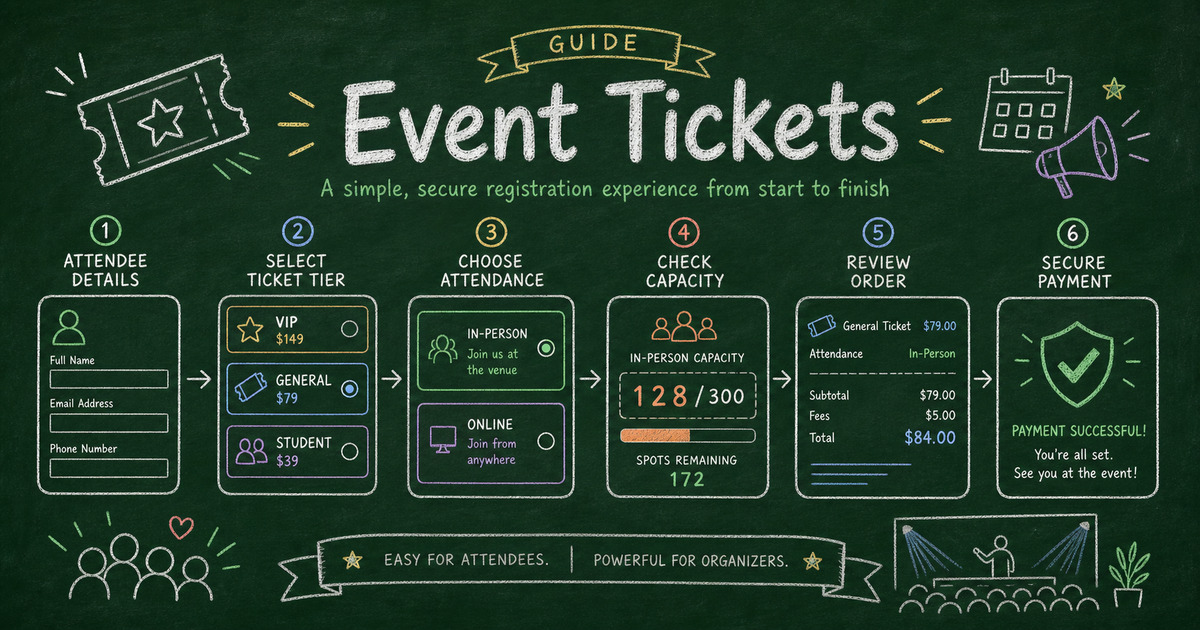
Build the paid workflow
Collect payment with the form
Turn the registration, order, booking, or donation flow into a payment-ready FormHug form.
Ticket sales are rarely just ticket sales. Even a small workshop, meetup, training, fundraiser, or conference needs attendee names, emails, ticket types, dietary notes, accessibility needs, consent, reminders, and sometimes session choices. A plain checkout link can collect money, but it leaves the event organizer stitching the attendee list together somewhere else.
An event registration form with payment keeps the ticket and the attendee record together. The buyer chooses the ticket, answers the registration questions, sees the amount due, and pays through Stripe before the registration is complete.
This article explains when to sell tickets through a form, what fields to include, how Text Option pricing works, and how to build a paid registration workflow in FormHug.
TL;DR - A paid event registration form collects attendee details and Stripe ticket payment in one workflow.
- Use a form when ticket context matters - attendee details, sessions, meals, access needs, consent, and reminders belong with the payment.
- Use Text Option for ticket tiers - combine choices like ticket type and attendance option into one paid variant.
- Keep capacity clear - ticket limits, close dates, and refund rules should be visible before checkout.
- Works for: workshops, conferences, fundraisers, trainings, meetups, webinars, and paid community events.
- A form is lighter than event software when you need a focused paid signup flow.
What Is a Paid Event Registration Form?
A paid event registration form is an online form that collects attendee information and payment before someone is added to the attendee list. It usually includes contact details, ticket type, session choice, guest count, policy acknowledgement, and confirmation details.
The difference from a payment link is the attendee record. You are not only collecting “$49.” You need to know who is coming, what they bought, how to contact them, and what they need on the day of the event.
For broader registration fields, see event registration questions. For payment setup, see Stripe form builder: accept payments without a store.
When Should You Sell Tickets Through a Form?
Use a form when the attendee information affects planning. A concert with assigned seating may need dedicated ticketing software. A workshop or community event often just needs a clean paid registration record.
| Event type | Why a form works |
|---|---|
| Workshop | collect attendee goals, ticket type, and payment |
| Training | collect role, organization, dietary notes, and fee |
| Fundraiser | collect guest count, donation add-on, and consent |
| Conference side event | collect badge name, session choice, and access needs |
| Webinar | collect registration info and paid access option |
Use a specialized ticketing platform when you need seat maps, QR scanning gates, complex resale, promoter tools, or large-scale venue operations. Use a form when your real job is registration plus payment.
Build the Attendee Roster Before Checkout
The goal of a ticket form is not only to collect money. It is to produce a usable attendee roster the moment payment succeeds. Before adding Stripe, decide what columns the organizer will need on event day.
| Roster column | Why it matters |
|---|---|
| Attendee name and email | check-in, reminders, and support |
| Ticket type | pricing, access level, and capacity |
| Quantity or guest count | room setup, food, and badges |
| Session or attendance option | breakout planning and access links |
| Organization or role | networking, seating, or internal reporting |
| Dietary or accessibility needs | venue preparation and attendee care |
| Policy acknowledgement | refund, cancellation, and event terms |
| Payment status | separates confirmed attendees from incomplete registrations |
This keeps the article’s core decision clear: if the event team cannot run the room from the exported roster, the registration form is under-specified. Payment should come after ticket choice and policy context, but before the registration is counted as confirmed.
Use Text Option for Ticket Tiers
Text Option is the best payment field when the final price comes from text choices. Ticket forms often combine ticket type, attendance length, access level, early-bird status, or workshop package.
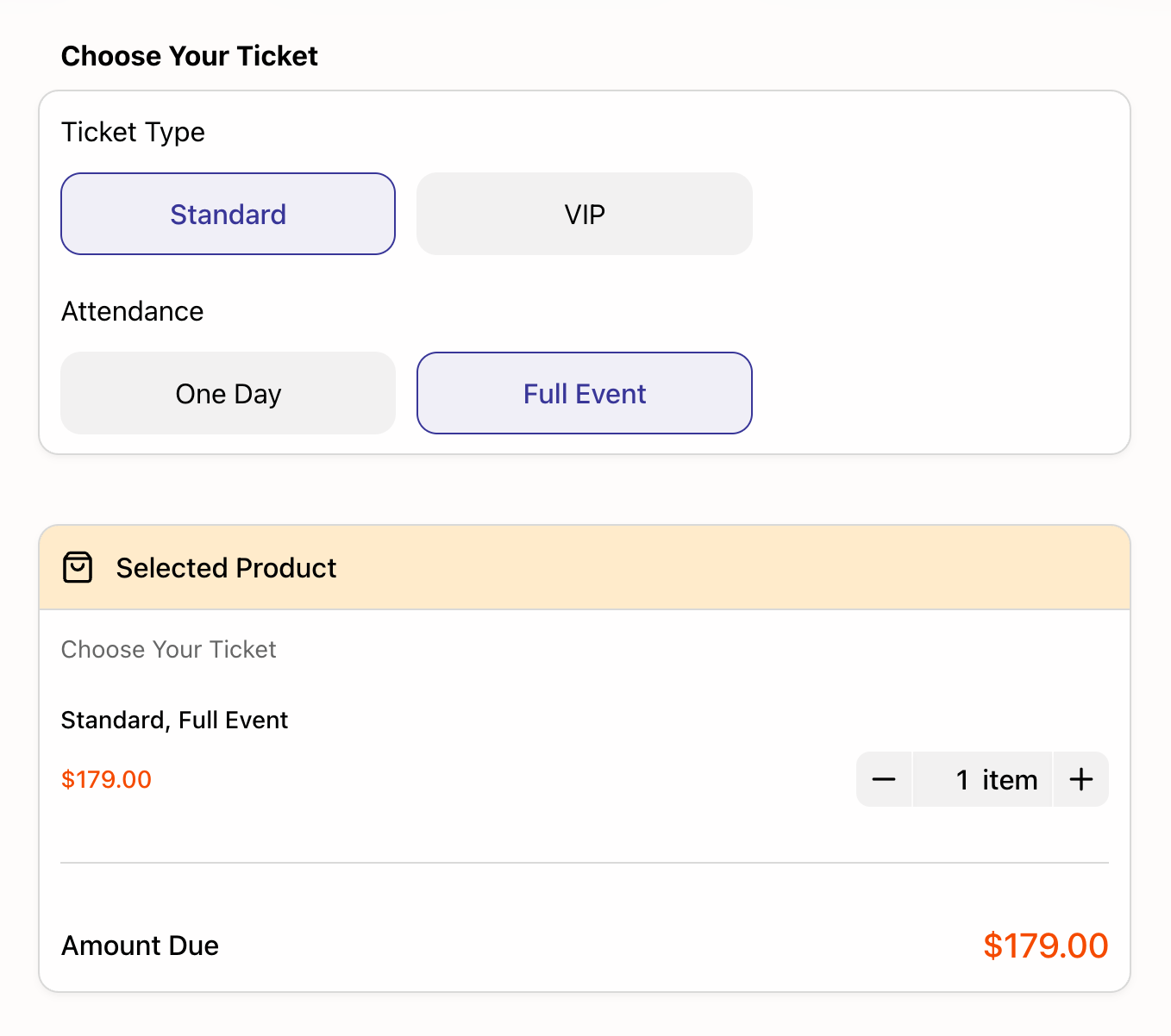
In this demo, the buyer chooses a ticket type and an attendance option. The selected combination controls the price shown in the order summary. That is cleaner than making separate products for every possible combination.
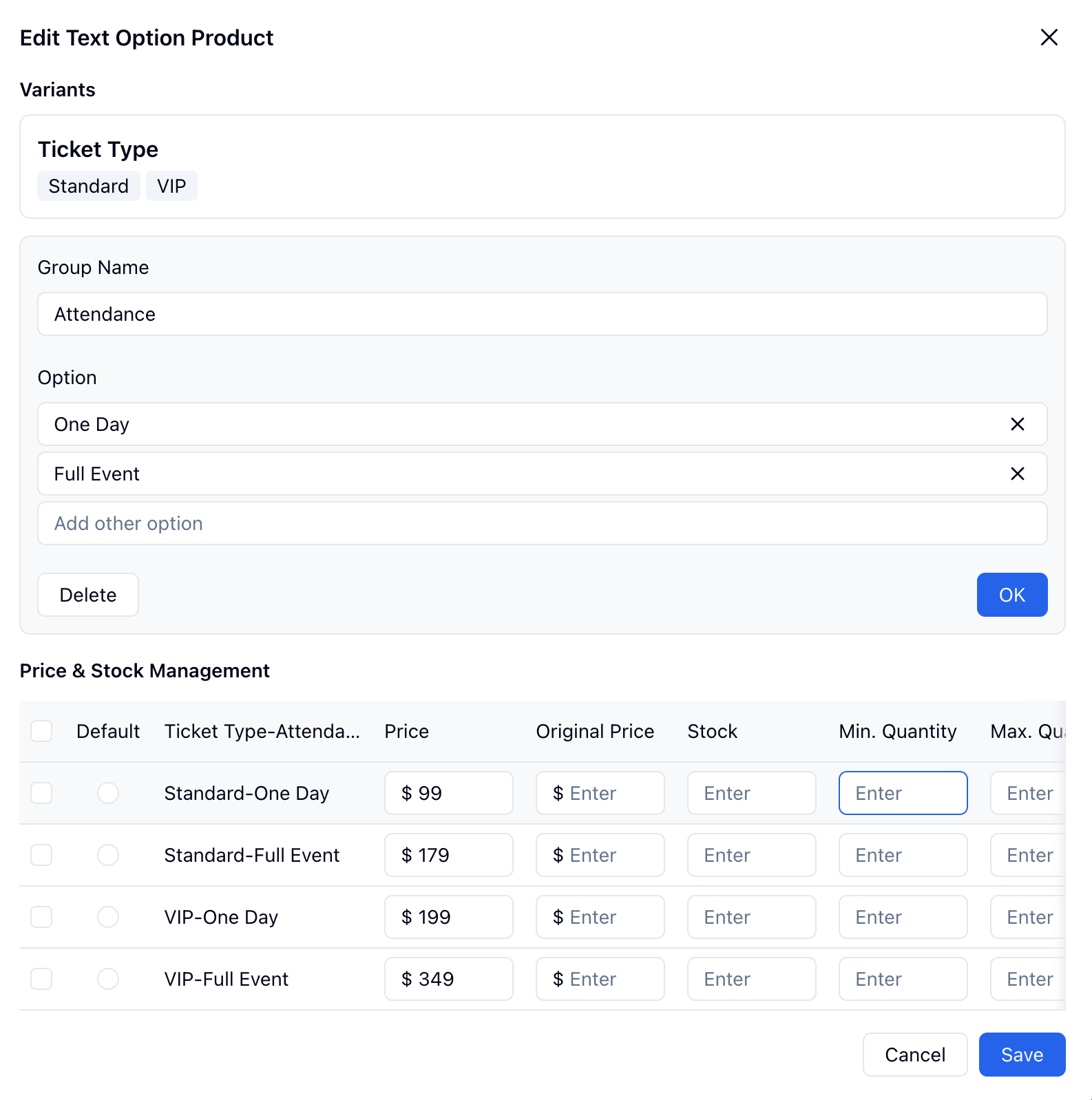
Use Text Option when the buyer should choose one paid ticket configuration. Use Product when the event sells physical items or add-ons. Use Price-Only for a simple registration fee or optional donation.
Ready-Made Templates for Paid Events
Start from a registration template when the event workflow matters more than the payment field:
- Event Registration Form Template - for general events and attendee lists.
- Workshop Registration Form Template - for hands-on classes and paid workshops.
- Webinar Registration Form Template - for online sessions and paid access.
- Payment Form Template - for simple ticket fees or event deposits.
For a wider registration comparison, read best registration form templates.
How to Sell Event Tickets in FormHug
Step 1: Start with the capacity math
List the total seats, ticket types, prices, close dates, and any limits by option. Decide whether early-bird pricing, VIP access, guest count, session choice, or donation add-ons belong in the same flow.
Step 2: Build the roster fields
Add the fields the organizer will actually scan later: name, email, ticket, organization, dietary needs, accessibility needs, and consent. Keep marketing questions out unless someone will use them before the event.
Step 3: Price the ticket choice
Use Text Option for ticket combinations, Product for add-ons, or Price-Only for a simple fee. Make the total visible before submission so attendees understand what they are buying.
Step 4: Test the organizer view
Submit a test registration, check payment status, and export the attendee list. The test passes only if someone can open the roster and know who is confirmed, which ticket they bought, and what the event team needs to prepare.
Frequently Asked Questions
How do I sell tickets through a form?
Create an event registration form with attendee details, ticket type, capacity or policy fields, and Stripe payment. The attendee should pay before the registration is counted as confirmed.
Can I use Stripe to sell event tickets?
Yes. A Stripe-connected form can collect ticket payment while keeping attendee details and ticket choices in the same submission record.
Is a form better than an event ticketing platform?
Use a form for workshops, trainings, webinars, fundraisers, and smaller events where registration details matter. Use dedicated ticketing software for seat maps, venue scanning, resale, and large-scale event operations.
What is the best payment field for ticket tiers?
Use Text Option when the ticket price depends on choices such as ticket type, attendance option, access level, or package. It keeps paid combinations in one field.
Should I collect payment before confirming registration?
For paid events, yes. If payment is required, collect it before treating the attendee as confirmed. If approval is required first, collect the application before payment and send payment instructions after acceptance.
What should I test before publishing a paid event form?
Submit at least one test registration for each ticket type. Check the price, confirmation message, payment status, exported roster, and any capacity limits before sharing the form publicly.
Can FormHug create a paid event registration form?
Yes. FormHug AI can draft a registration form, and you can add ticket options, Stripe payment, attendee fields, policy acknowledgement, confirmation messages, and exports.
Related
- Event Registration Questions to Ask Before Someone Attends - choose attendee fields for paid and free events
- Best Registration Form Templates - compare event, webinar, workshop, class, and membership templates
- Stripe Form Builder: How to Accept Payments Without a Store or Checkout Page - understand the form + payment model
- How to Sell Merchandise Through a Form Without Shopify - sell event merch or add-ons alongside paid registration
Every paid event registration split across a payment link and a spreadsheet creates cleanup work before the event even starts. Keep the ticket, attendee details, and payment in one form. Create your form →

Written by
FormHug TeamProduct, research, and form automation team
The FormHug Team brings together product builders, workflow researchers, and form automation practitioners who study how people collect, route, and act on information online. Our guides are based on hands-on product testing, template analysis, customer workflow patterns, and deep experience with forms, surveys, quizzes, AI-assisted creation, integrations, and results sharing.