How to Sell Merchandise Through a Form Without Shopify
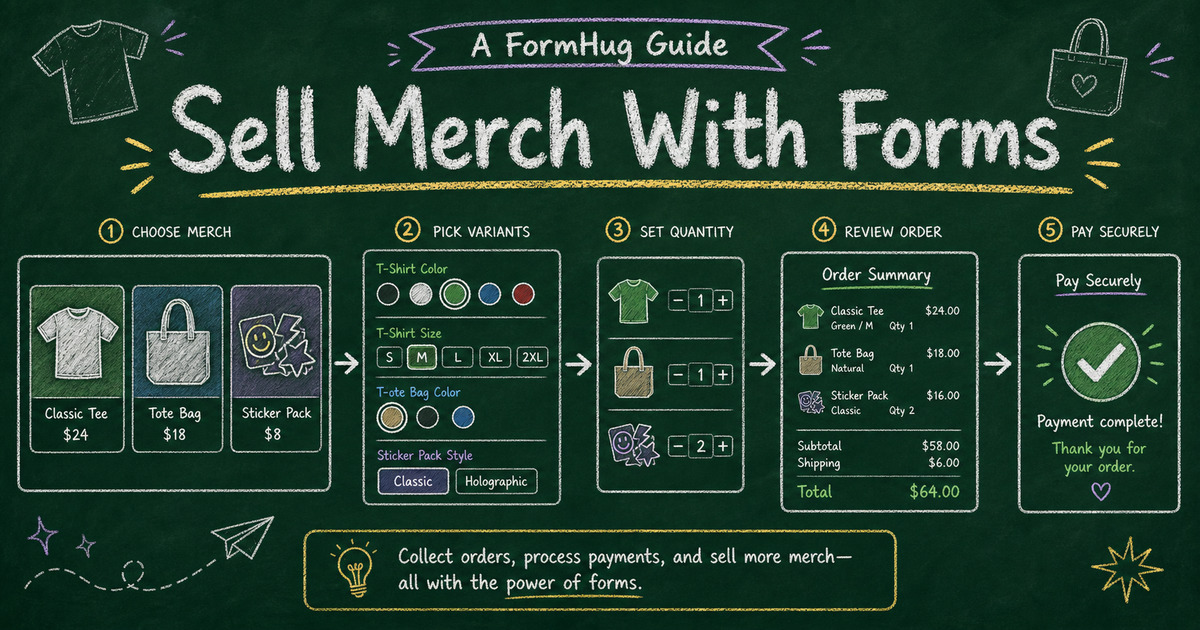
Build the paid workflow
Collect payment with the form
Turn the registration, order, booking, or donation flow into a payment-ready FormHug form.
Most merchandise drops do not need a full storefront. A team shirt, conference tote, school hoodie, creator sticker pack, or limited event bundle usually needs one clean order path: show the item, collect size and quantity, get the buyer’s details, and take payment before you produce or ship anything.
That middle ground is where many small sellers get stuck. A Stripe link can collect money, but it does not naturally collect size, color, personalization, pickup details, and order notes in a structured way. Shopify can do all of that, but it also asks you to set up a store, product catalog, theme, policies, shipping, tax settings, and store operations.
A merchandise order form gives you the useful part of a store without the weight of running one. This article explains when to sell merchandise through a form, what fields to include, how Product payment fields work, and how to build a merch order workflow in FormHug.
TL;DR - A merchandise order form collects product choices, variants, quantities, buyer details, and Stripe payment in one submission.
- Use a form when the drop is focused - shirts, totes, stickers, team gear, preorder bundles, and event merch work well.
- Use Product fields when images matter - buyers can compare item photos, prices, variants, and quantities before paying.
- Skip the store when you do not need one - a form is lighter than Shopify for one-off or small-batch merch campaigns.
- Works for: creator merch, event swag, school apparel, sports team kits, company merch drops, and small product bundles.
- FormHug charges 0% platform fees on paid plans; Stripe processing fees still apply.
What Is a Merchandise Order Form?
A merchandise order form is an online form that lets buyers choose products, variants, and quantities, then submit contact, delivery, and payment details in one workflow. It is usually simpler than an e-commerce store because it focuses on one campaign or a small set of items.
The key difference from a normal checkout page is that the form can ask campaign-specific questions. A team jersey order may need player name and number. A school hoodie order may need homeroom and pickup method. A conference tote order may need attendee badge name. Those details belong next to the payment, not in a separate spreadsheet.
For the broader payment pattern, see Stripe form builder: accept payments without a store. If your order workflow covers many product types, the free order form templates guide compares broader order form structures.
When a Form Beats a Store for Merch
Use the Small-Batch Merch Test: if your campaign has a clear audience, a short product list, and a closing date, a form is usually enough.
| Scenario | Form fit | Store fit |
|---|---|---|
| One team shirt drop | Strong | Usually too much |
| Conference swag preorder | Strong | Usually too much |
| Creator sticker pack | Strong | Maybe, if ongoing |
| Multi-category retail catalog | Weak | Strong |
| Ongoing inventory and shipping operation | Weak | Strong |
The form works because the buyer is not browsing a store. They already know why they are there: order the shirt, reserve the hoodie, buy the bundle, support the creator. The job is to reduce friction between intent and paid order.
Capture the Details That Prevent Merch Mistakes
Merch forms succeed or fail on small details. The payment can be perfect and the order can still go wrong if the buyer picked the wrong size, skipped pickup details, or entered personalization in an email thread instead of the order record.
| Order risk | Field that prevents it |
|---|---|
| Wrong item | product card with image and description |
| Wrong size or color | variant choices for size, color, edition, or bundle |
| Too many or too few items | quantity controls and limits |
| Fulfillment confusion | pickup, shipping, or delivery notes |
| Personalization mistakes | optional name, number, engraving, or custom text field |
| Lost buyer context | name, email, event, team, or organization |
| Unpaid orders | Stripe payment and order summary |
Keep the form as close to the real packing list as possible. If pickup is at an event, you may not need a shipping address. If the item has one color, do not add a color field. If personalization is optional, make that path conditional so most buyers can skip it.
Use Product Fields When Images Matter
Merchandise is visual. A product image helps buyers confirm they are choosing the right shirt, tote, sticker, poster, or bundle. FormHug’s Product payment field is built for this kind of selection: product cards, images, descriptions, variants, quantity controls, stock, discounts, and selected-product summaries.
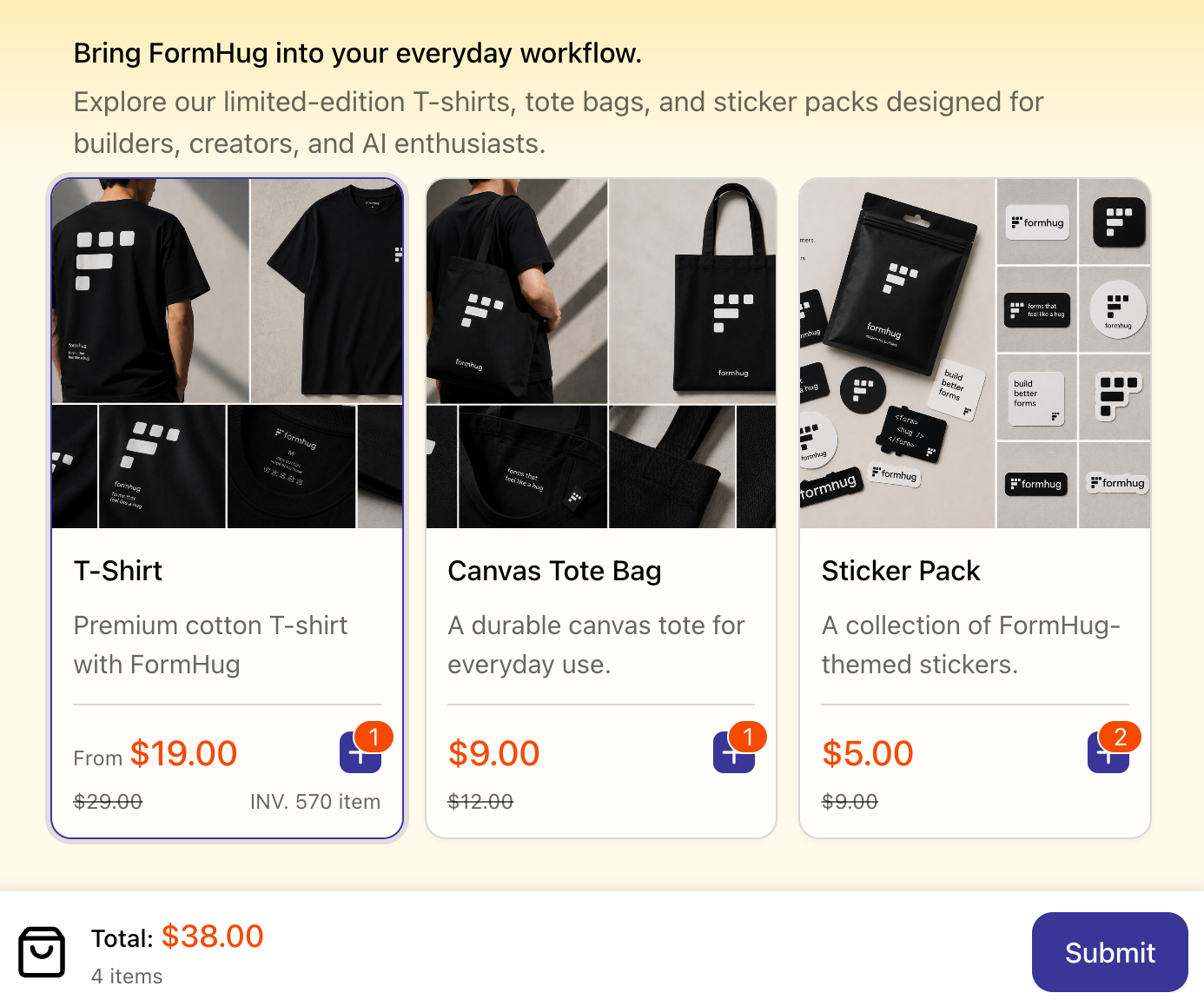
In the demo, each product appears as a card with a price and add-to-order action. We built this example around a small merch store because it shows the difference between a payment link and a product form: the buyer can choose the item, review the quantity, and see the order summary before payment.
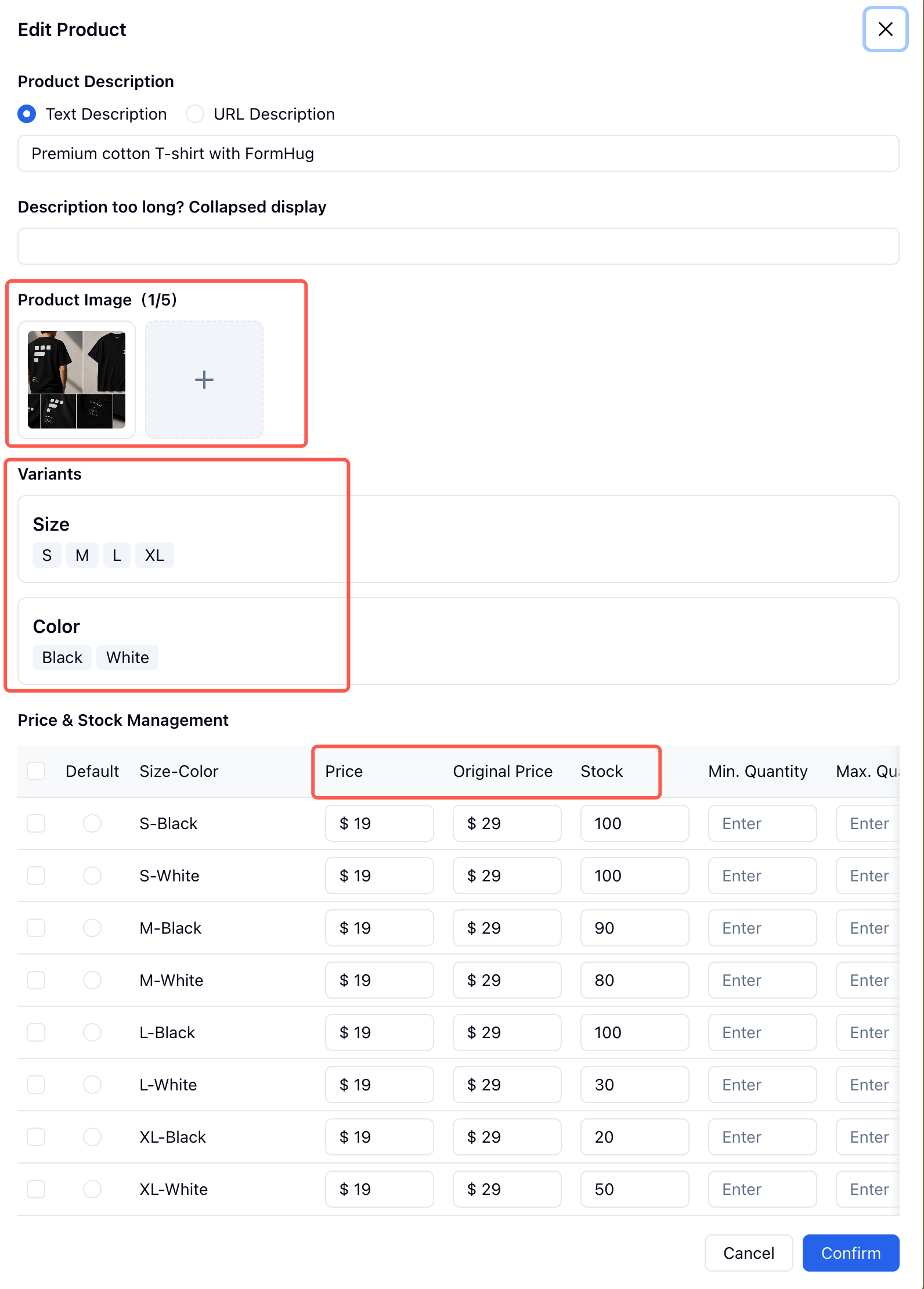
Product variants are where merch forms become useful. Size and color are obvious examples, but the same pattern works for edition, material, bundle, print style, sleeve length, or personalization tier.
Ready-Made Merch and Order Templates
Start from a close template when the selling structure already exists:
- T-Shirt Order Form Template - for apparel, team shirts, school shirts, and event merch.
- Product Order Form Template - for small catalogs with images and quantities.
- Order Form Template - for a general product or service order flow.
- Pre-Order Form Template - for validating demand before production.
Templates are not locked. Replace the sample products, add your own images, update the options, and remove any fields that do not matter for your campaign.
How to Sell Merchandise Through a Form in FormHug
Step 1: Write the drop rules
Write what you are selling, who it is for, when orders close, and how fulfillment works. A clear drop brief prevents the form from becoming a mini store with too many choices.
Step 2: Build the order card
Use Product fields for visual merchandise. Add item photos, descriptions, size or color variants, prices, stock, default quantities, and maximum quantities if you need to prevent over-ordering.
Step 3: Add fulfillment details after selection
Add only the details needed to complete the order: contact info, pickup method, shipping address, event name, personalization, or notes. Keep fulfillment details after product selection so buyers first commit to what they want.
Step 4: Pack from a test order
Connect Stripe, submit a test order, and read the submission as if you were packing the item. The selected-product summary should show item, variant, quantity, fulfillment method, and payment status without extra detective work.
Frequently Asked Questions
How do I sell merchandise without Shopify?
Use a merchandise order form when you only need to sell a focused set of items. Add product photos, size or color variants, quantity controls, buyer details, and Stripe payment in one form.
Can I sell T-shirts through a form?
Yes. A T-shirt order form can collect size, color, quantity, personalization, pickup or shipping details, and payment. It works especially well for team shirts, school events, creator drops, and conference merch.
Is a form better than a Stripe payment link for merch?
A payment link is enough when the buyer only needs to pay a fixed amount. A form is better when you need size, color, quantity, shipping notes, personalization, or other order details attached to the payment.
When should I use Shopify instead of a merch form?
Use Shopify when you need an ongoing store with many products, browsing, inventory operations, shipping workflows, discount systems, and repeat retail customers. Use a form for focused drops and small-batch campaigns.
Can I limit stock or quantities in a merch form?
Yes. Product fields can include stock and quantity rules. Use them when the product is limited, when each buyer should order only a few items, or when a preorder campaign has a production cap.
Can FormHug create a merchandise order form?
Yes. FormHug AI can draft a merch order form from a prompt, and you can add Product fields, variants, images, Stripe payment, confirmation text, and follow-up workflows.
Related
- Stripe Form Builder: How to Accept Payments Without a Store or Checkout Page - understand the broader form + Stripe payment workflow
- 13 Free Order Form Templates for 2026 - compare order templates for products, services, food, donations, and admin workflows
- How to Create a Multi-Step Form That Reduces Drop-Off - structure longer order forms without overwhelming buyers
- How to Collect Donations Through a Form - use Price-Only payment when the amount is the main choice
Every merch order that lands in a chat thread or spreadsheet creates another chance to miss a size, quantity, or payment. Put the product choice and the payment in one form instead. Create your form →

Written by
FormHug TeamProduct, research, and form automation team
The FormHug Team brings together product builders, workflow researchers, and form automation practitioners who study how people collect, route, and act on information online. Our guides are based on hands-on product testing, template analysis, customer workflow patterns, and deep experience with forms, surveys, quizzes, AI-assisted creation, integrations, and results sharing.