FormHug vs Paperform (2026): The Best Free Paperform Alternative
Compare your options
See how FormHug fits the workflow
Compare FormHug against other form builders when AI creation, quizzes, payments, templates, or agent workflows matter.
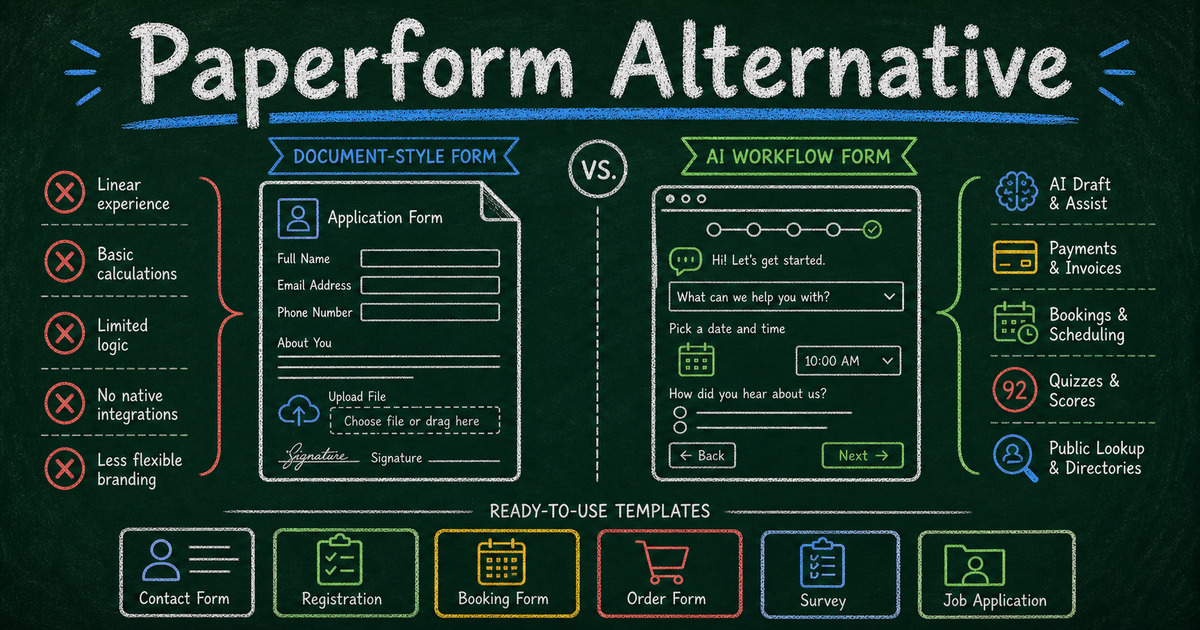
Paperform is one of the better form builders if you want a form that feels like a landing page. It gives creators and businesses strong design control, payments, calculations, bookings, templates, and a polished editor for building forms that read more like pages than spreadsheets.
That strength also explains why people search for a Paperform alternative. Paperform is powerful, but it is not the lightest way to start, and its value shows most clearly after you are ready to pay. If you want an AI-first form builder with a free starting point, quiz and assessment workflows, respondent lookup, and AI agent integration, FormHug is a better fit.
This comparison is for users who like Paperform’s quality but want a form builder that starts faster, costs less to try, and is built around newer workflows: AI generation, public result lookup, quizzes, bookings, payments, and Claude/Cursor-style agent use.
Why People Look for a Paperform Alternative
Most Paperform alternative searches start from one of three moments.
The first is pricing. Paperform is a premium form builder. That is reasonable for teams that need its full landing-page style editor, payments, calculations, appointments, and integrations, but it can be too much when someone simply wants to publish a survey, registration form, quiz, application, or feedback form quickly.
The second is creation speed. Paperform gives you a lot of control, which means you spend more time shaping the page. That is useful for polished sales forms and client-facing forms. It is less useful when you want to describe a form in one sentence and get a working draft immediately.
The third is workflow fit. Paperform is strong at forms-as-pages. FormHug is stronger at forms-as-workflows: AI creation, quiz scoring, certificates, public respondent lookup, booking, payments, and direct use inside AI agents.
TL;DR: FormHug vs Paperform at a Glance
| Feature | FormHug | Paperform |
|---|---|---|
| Free starting point | ✅ Free tier | ⚠️ Trial / paid-first model |
| AI form creation | ✅ Core builder workflow | ⚠️ AI assistance exists, but editor-first |
| Landing-page style editor | ⚠️ Polished form layouts | ✅ Strong document-style page editor |
| Payments | ✅ Payment-friendly forms | ✅ Strong payments and product workflows |
| Bookings | ✅ Booking forms | ✅ Appointment scheduling available |
| Quiz scoring and certificates | ✅ Built for quizzes, assessments, certificates | ⚠️ Possible, but not the core strength |
| Public Query lookup | ✅ Respondents can retrieve their own records | ❌ No equivalent |
| AI agent / MCP workflow | ✅ Claude, Cursor, MCP-compatible agents | ❌ No native MCP workflow |
| Templates | ✅ Forms, surveys, quizzes, registrations | ✅ Large template library |
| Best fit | AI-first workflows, quizzes, lookup, public forms | Branded page-like forms, payments, sales forms |
What Is Paperform?
Paperform is a form builder known for its document-style editor, visual flexibility, templates, payments, calculations, scheduling, and business workflows. It is often used for order forms, bookings, registrations, surveys, lead capture, onboarding, and creator forms.
Its biggest strength is presentation. A Paperform can feel closer to a landing page than a conventional form. That makes it strong for businesses that want careful copy, product blocks, conditional logic, payments, and a highly controlled form page.
What Is FormHug?
FormHug is an AI form builder for users who want to generate and publish useful forms faster: surveys, quizzes, assessments, registration forms, application forms, booking forms, payment forms, and public lookup workflows.
The practical difference is the starting point. With FormHug, you can describe the outcome you want and let AI draft the form structure. In our testing, that is especially useful for forms where the structure matters more than long-form page design: feedback forms, application forms, registration templates, and survey analysis workflows.
Feature-by-Feature Comparison
AI Form Creation
Paperform gives you a powerful editor, templates, and AI-assisted capabilities, but the core workflow still feels like crafting a form page. That is a strength when the copy, layout, and offer matter.
FormHug puts AI generation at the center. Describe the form: “Create a 10-question vendor application with eligibility, insurance, product category, availability, and follow-up consent.” FormHug drafts the structure so you can edit instead of start blank.
Verdict: FormHug for AI-first creation; Paperform for users who want to handcraft a page-like form.
Design, Branding, and Page Feel
Paperform is hard to beat when the form needs to feel like a mini landing page. You can combine copy, media, questions, payments, and conditional paths in a page-like editor. That is why many creators, agencies, and businesses like it.
FormHug focuses on polished form experiences rather than page composition. The forms look modern, support visual customization, and work well for surveys, registrations, applications, quizzes, and bookings, but they are not trying to replace a full landing page editor.
Verdict: Paperform wins for long, page-like branded forms. FormHug wins when the form should be clean, fast, and workflow-driven.
Payments and Order Forms
Both tools can support payment-related workflows. Paperform is especially strong for order forms, paid bookings, product-style forms, and sales pages. If your form is close to checkout, Paperform deserves serious consideration.
FormHug is also a strong fit when payment is part of a broader form workflow: class registration, event signup, deposits, service requests, or intake forms that need payment without a separate checkout page.
For payment-specific use cases, see how to create a payment form and free order form templates.
Verdict: Paperform for complex page-like commerce forms; FormHug for payment inside registrations, bookings, and practical form workflows.
Quizzes, Assessments, and Results
Paperform can be adapted for quizzes and scored forms, but its core identity is not a quiz or assessment engine.
FormHug is built for quizzes, assessments, mini exams, personality tests, skills checks, and respondent-facing results. That includes scoring, answer feedback, certificates, and richer result experiences depending on the workflow.
If your use case is education, training, assessment, or interactive lead capture, compare how to create an online quiz, how to create a mini exam online, and how to build a product recommendation quiz.
Verdict: FormHug for quizzes and assessments; Paperform for forms where quiz behavior is secondary.
Bookings and Appointments
Paperform supports appointment and booking workflows, which is one reason it works well for service businesses. If your booking form also needs rich page copy, payment, and a more sales-driven presentation, Paperform is a good fit.
FormHug supports booking forms for people who want the scheduling flow inside a broader form builder. That is useful for consultations, classes, workshops, intake sessions, and service requests where booking is one piece of the submission.
Verdict: Draw. Paperform is stronger for sales-page-style booking forms; FormHug is stronger when booking sits inside AI-generated form workflows.
Public Query and Respondent Lookup
This is where FormHug is meaningfully different. Public Query lets respondents retrieve their own record later by entering allowed search information, such as an email, ID, name, or registration detail.
That supports workflows Paperform is not designed around: exam result lookup, race result lookup, training result sharing, registration confirmation, application status, and private per-person public pages.
Examples: a student checks a result without emailing the teacher; an attendee confirms a registration detail; a participant looks up a race placement; an applicant checks whether their submission was received.
Verdict: FormHug. Paperform has no equivalent to Public Query.
AI Agent and MCP Workflows
FormHug connects to Claude, Cursor, and MCP-compatible agents through its MCP server. That means a user or agent can create forms, read submissions, and work with form data through a natural-language workflow.
Paperform is a strong web app, but it is not built as an AI-agent form layer. If your team is exploring forms as a tool that agents can create and operate, FormHug is the better direction.
Verdict: FormHug for AI agent workflows.
Templates and Starting Points
Paperform has a large template library, and the templates are one of its strengths. They are especially useful for businesses that want polished page-like forms for bookings, orders, client onboarding, and sales workflows.
FormHug’s template direction is more workflow-specific: registration forms, applications, surveys, quizzes, feedback forms, payment forms, and lookup-friendly workflows. Use best form templates for businesses if you want a broader map of where each form type fits.
Verdict: Paperform for a larger polished template catalog; FormHug for AI-generated and workflow-focused starting points.
Pricing Comparison
| Plan | FormHug | Paperform |
|---|---|---|
| Free | ✅ Free tier available | ⚠️ Trial / paid-first model |
| Paid | Paid plans for advanced features and scale | Paid plans unlock ongoing use and advanced workflows |
| Payments | Payment-friendly workflows | Strong payment and product form support |
| Best value when | You want AI creation, quizzes, lookup, and flexible forms | You want polished page-like forms and commerce workflows |
Paperform can be worth paying for if its editor and sales-style form pages are central to your workflow. FormHug is better when you want to start free and grow into AI-generated forms, quizzes, applications, bookings, payments, and lookup.
Who Should Switch to FormHug?
- Users who want a free starting point before committing to a paid form platform
- Teams that want AI to draft the form instead of manually building from a page editor
- Educators and trainers creating quizzes, assessments, certificates, or mini exams
- Event, class, and program organizers building registration, payment, booking, or feedback workflows
- Teams that need respondent lookup for results, registrations, status checks, or private record access
- AI builders using Claude or Cursor who want forms to become part of an agent workflow
- Small teams that need practical forms fast rather than a highly designed mini landing page
Who Should Stay on Paperform?
- Creators and businesses that need page-like forms with rich copy, media, products, and carefully designed sales flows
- Teams already getting value from Paperform payments and calculations
- Agencies building polished client-facing form pages where design control matters more than AI-first drafting
- Users who prefer crafting the form manually and want maximum control over the page experience
Final Verdict
Paperform is a strong product. If your form needs to behave like a branded landing page with payments, products, scheduling, calculations, and polished presentation, it may still be the right choice.
FormHug is the better Paperform alternative when the form’s job is less about page composition and more about workflow: generate it with AI, publish it quickly, collect structured responses, score a quiz, book a time, take a payment, or let respondents look up their own result later.
Paperform is for people who want to design the form page. FormHug is for people who want the form to do the job.
Frequently Asked Questions
What is the best Paperform alternative?
The best Paperform alternative depends on why you are switching. FormHug is a strong choice if you want AI form creation, a free starting point, quizzes, assessments, payment-friendly forms, bookings, Public Query lookup, and AI agent workflows.
Is Paperform free?
Paperform is generally a paid form builder with trial access. If you need a free starting point for publishing forms, FormHug is a better fit.
Is FormHug better than Paperform?
FormHug is better for AI-generated forms, quizzes, assessments, public lookup, and agent-ready workflows. Paperform is better for page-like forms with rich design control, sales copy, payments, products, and handcrafted presentation.
Can FormHug replace Paperform for payments?
For many registration, booking, class, event, deposit, and order workflows, yes. Paperform remains strong for more page-like commerce forms where products, copy, and layout are central to the experience.
Does Paperform have Public Query?
No. Public Query is a FormHug feature that lets respondents retrieve their own record or result through a safe lookup page. It is useful for exam results, registration confirmation, race results, training results, and application status workflows.
Can I use FormHug inside Claude or Cursor?
Yes. FormHug supports MCP workflows for Claude, Cursor, and compatible AI agents, so forms can be created and managed through a natural-language agent workflow.
Related
- 7 Best AI Form Builders in 2026 (Tested & Ranked) - compare FormHug across the wider AI form builder market
- How to Create a Payment Form - build paid registrations, deposits, and order forms
- FormHug vs Tally (2026) - compare another popular lightweight form builder alternative

Written by
FormHug TeamProduct, research, and form automation team
The FormHug Team brings together product builders, workflow researchers, and form automation practitioners who study how people collect, route, and act on information online. Our guides are based on hands-on product testing, template analysis, customer workflow patterns, and deep experience with forms, surveys, quizzes, AI-assisted creation, integrations, and results sharing.