How to Collect a Deposit When Someone Books an Appointment
Build the paid workflow
Collect payment with the form
Turn the registration, order, booking, or donation flow into a payment-ready FormHug form.
A booked slot is not always a confirmed slot. For photographers, coaches, salons, clinics, tutors, consultants, private chefs, and workshop hosts, the risky gap is familiar: someone asks for a time, you hold it, then the deposit link goes unpaid.
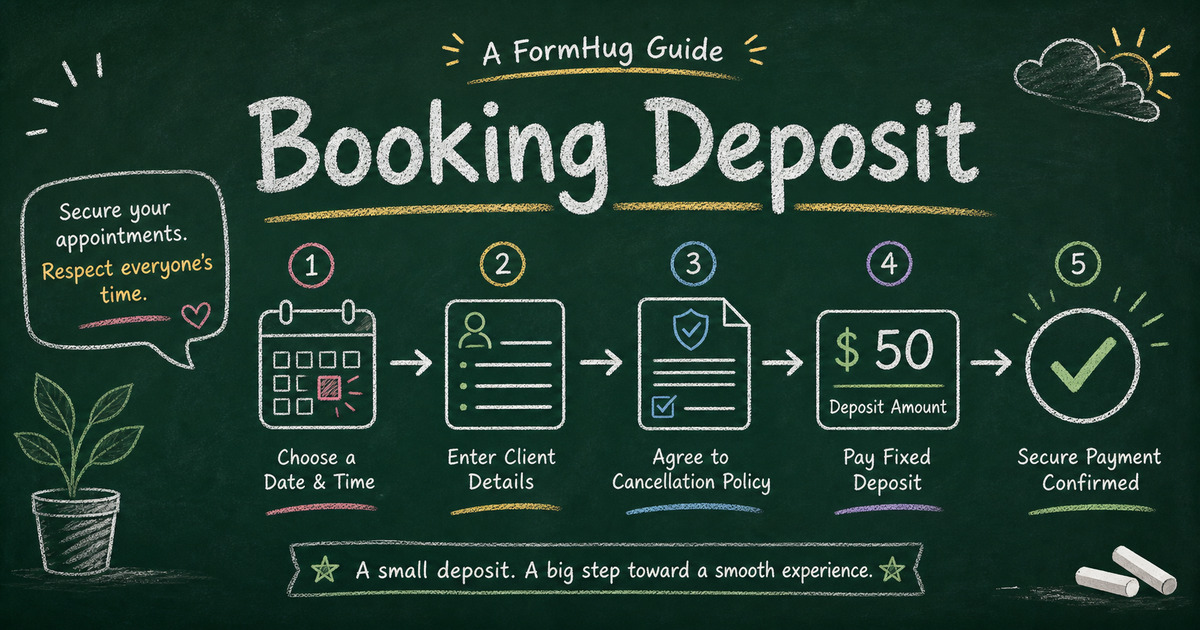
A booking deposit form closes that gap. The client chooses or requests the appointment, confirms the policy, gives you the details you need, and pays the deposit before the booking is treated as real. You get one record instead of a calendar note, an email thread, and a separate Stripe payment.
This article explains when to collect deposits, what a deposit form should include, how to choose the right payment field, and how to build a booking deposit workflow in FormHug.
TL;DR - A booking deposit form collects appointment context, client details, policy acknowledgement, and Stripe payment before a booking is confirmed.
- Use deposits when no-shows are costly - private sessions, high-demand slots, custom prep, and limited-capacity appointments.
- Keep the deposit amount simple - a fixed Price-Only field is usually enough unless the deposit changes by package.
- Explain the policy before payment - cancellation, refund, reschedule, and balance terms should be visible before checkout.
- Works for: salons, coaches, tutors, photographers, clinics, consultants, private events, and service providers.
- A form keeps the deposit attached to the appointment details, not floating in a separate payment link.
What Is a Booking Deposit Form?
A booking deposit form is an online form that collects appointment or service details and a partial payment before confirming the booking. It usually includes client contact information, date or session preference, service type, policy acknowledgement, and a Stripe payment field.
The deposit is not just about money. It marks commitment. A client who pays a deposit has confirmed the slot, accepted the terms, and given you a payment record tied to the booking details. That is much cleaner than sending a payment link after the conversation and hoping the client completes it.
If you need the broader booking workflow, read how to create an online booking form. For the payment infrastructure behind this pattern, see Stripe form builder: accept payments without a store.
When Should You Collect a Deposit?
Use the No-Show Cost Test: collect a deposit when a missed booking costs you time, inventory, prep work, or another customer.
| Booking type | Deposit reason |
|---|---|
| Photography session | reserves limited calendar time |
| Salon or spa appointment | reduces late cancellations |
| Coaching or consulting call | confirms client commitment |
| Private dining or tasting menu | covers preparation and capacity |
| Workshop or class seat | protects limited spots |
| Custom service project | starts work only after commitment |
Do not collect a deposit just because you can. If the service is casual, low-risk, or easy to refill, a deposit may add friction. If the appointment requires preparation or holds scarce capacity, payment before confirmation is usually fair.
Make the Deposit Policy Impossible to Miss
The deposit amount is only one part of the booking promise. The form should make the client’s commitment and your commitment visible before checkout.
| Policy question | Field or copy to include |
|---|---|
| What is being reserved? | service type, appointment request, package, date preference |
| What does the deposit cover? | deposit amount, remaining balance, due date |
| What happens if plans change? | cancellation, reschedule, refund, no-show terms |
| What does the provider need to prepare? | notes, requirements, files, address, preferences |
| When is the booking real? | acknowledgement checkbox and confirmation message |
That policy-first structure is what separates a deposit form from a generic payment form. The client should understand the terms before paying, and you should receive enough appointment context to decide whether the booking can be confirmed.
Price-Only vs Package-Based Deposits
For many bookings, Price-Only is the right payment field. The client is not choosing a product; they are paying a fixed amount to reserve the appointment. That makes the form short and easy to understand.
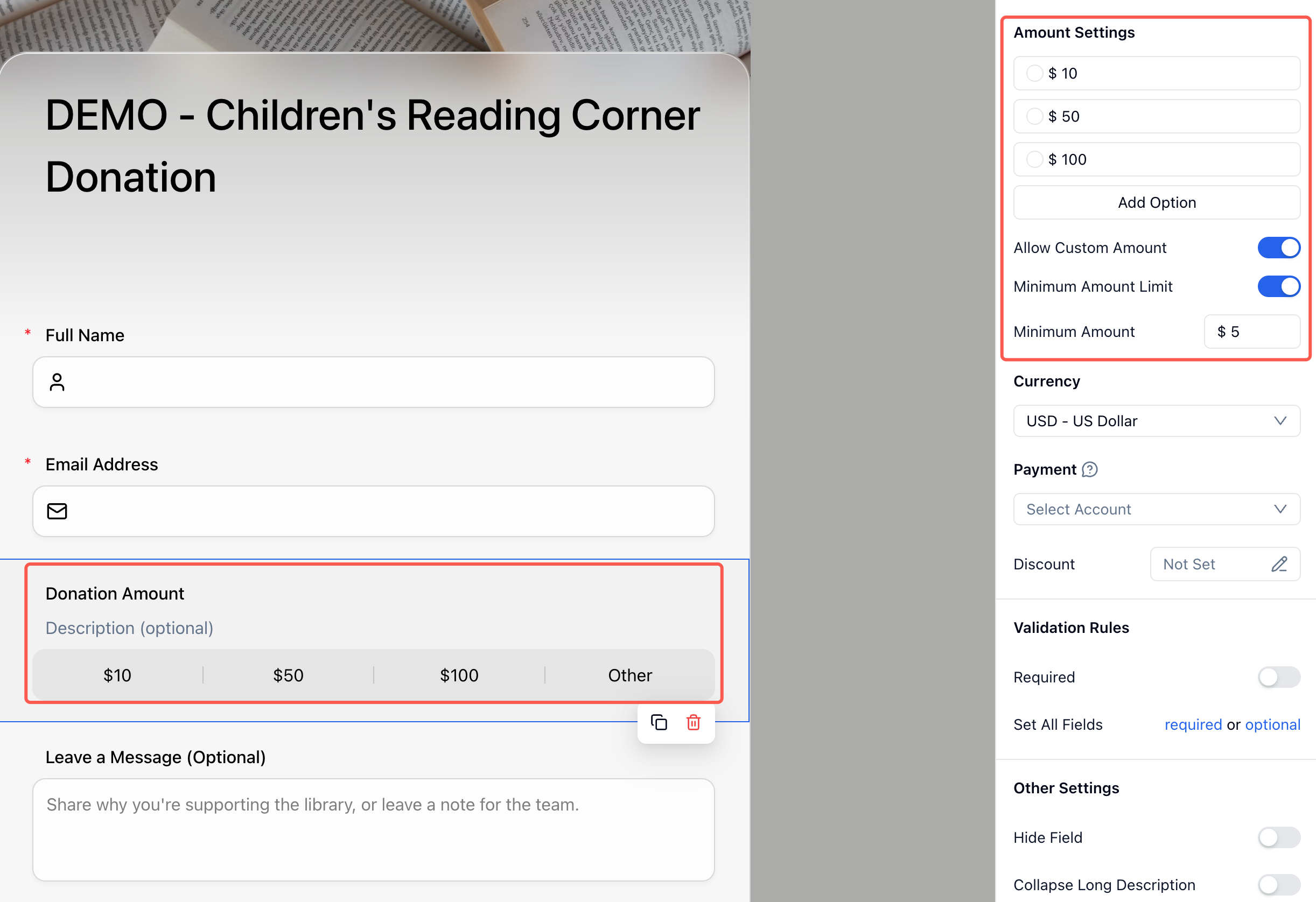
Use Text Product instead when the deposit depends on a package: mini session, full session, VIP session, private workshop, or multi-day service. Use Text Option when the price comes from a combination such as weekday vs weekend plus standard vs premium.
The important rule is that the selected amount must match the policy. If the client pays a $100 deposit toward a $500 package, say what remains, when it is due, and whether the deposit is refundable.
How FormHug Compares for Booking Deposits
| Option | Best for | Tradeoff |
|---|---|---|
| Stripe payment link | Simple deposit with no extra context | Booking details live elsewhere |
| Calendar booking tool | Scheduling-first appointment flow | Payment and custom intake may be limited |
| Full e-commerce store | Selling many services or packages | Too heavy for simple appointment deposits |
| FormHug payment form | Deposit plus client details, policies, notes, and follow-up | Not a full calendar availability engine |
FormHug is strongest when the deposit and the intake details belong together. If you need live calendar availability, pair the form with your scheduling process. If you need a simple paid confirmation flow, the form can be the full workflow.
Ready-Made Templates for Deposit Workflows
Start with the closest payment or service template, then simplify:
- Service Order Form Template - for appointment-based businesses and freelancers.
- Payment Form Template - for fixed deposits or agreed project payments.
- Order Form Template - for services with add-ons or packages.
- Pre-Order Form Template - for deposits before production or fulfillment.
If the booking itself is the main workflow, pair these ideas with a booking form template collection so the appointment questions stay focused.
How to Collect a Booking Deposit in FormHug
Step 1: Write the booking promise
Before building, write the promise in plain English: what the deposit reserves, what it does not reserve, what happens if the client cancels, and when the remaining balance is due.
Step 2: Ask for the details that affect confirmation
Collect appointment type, preferred date or time, client contact details, and any notes you need before confirming the slot. If you manually approve bookings, say that clearly in the confirmation message.
Step 3: Put the deposit after the terms
Use Price-Only for a fixed deposit, Text Product for service packages, or Text Option for paid combinations. Show the deposit amount before the client reaches payment.
Step 4: Test the no-show scenario
Submit a test booking and read the record as if the client misses the appointment. The deposit amount, policy acknowledgement, requested slot, and contact details should be easy to find without searching through notes.
Frequently Asked Questions
How do I collect a deposit for an appointment?
Create a booking form with appointment details, client contact information, deposit amount, policy acknowledgement, and Stripe payment. Treat the booking as confirmed only after the deposit is paid.
Can I collect a deposit without a full booking system?
Yes. If you do not need live calendar availability, a form can collect the booking request and deposit in one flow. You can confirm the final time manually after reviewing the submission.
Should payment be before or after the booking questions?
Payment usually belongs after the client chooses the service and sees the policy. Explain early that a deposit is required, then collect it near the end as the confirmation step.
What is the best payment field for deposits?
Use Price-Only for a fixed deposit. Use Text Product when the deposit depends on a package, and Text Option when the deposit depends on a paid combination such as ticket type or session type.
Should booking deposits be refundable?
That depends on your business, local rules, and the service being booked. The form should state the refund, cancellation, and reschedule policy before payment so clients can consent clearly.
Can FormHug create a booking deposit form?
Yes. FormHug AI can draft the booking form, and you can add service questions, policy acknowledgement, a Price-Only deposit field, Stripe payment, and confirmation text.
Related
- Stripe Form Builder: How to Accept Payments Without a Store or Checkout Page - compare form-based payment with payment links and stores
- How to Create an Online Booking Form - build the appointment request side of the workflow
- Restaurant Reservation Form: How to Take Bookings Without a Phone Call - use deposits for high-risk dining reservations
- How to Create a Multi-Step Form That Reduces Drop-Off - place payment at the right moment in longer forms
Every unpaid deposit link leaves a booking half-confirmed. Put the appointment context, policy, and payment in one form so the slot becomes real before you hold it. Create your form →

Written by
FormHug TeamProduct, research, and form automation team
The FormHug Team brings together product builders, workflow researchers, and form automation practitioners who study how people collect, route, and act on information online. Our guides are based on hands-on product testing, template analysis, customer workflow patterns, and deep experience with forms, surveys, quizzes, AI-assisted creation, integrations, and results sharing.