How to Build a Multilingual Registration Form with AI Translation
Create with AI
Describe the workflow and get a form draft
Use FormHug to create forms from prompts, then share, automate, and reuse the structured responses.
One registration form can become five different experiences the moment people start reading it.
A parent signing up for a school program may understand conversational English but hesitate over consent wording. A new resident may know which service they need but not how to answer a medical screening question. An international attendee may recognize the event name but miss a date, time, or eligibility note because the form assumes one default language.
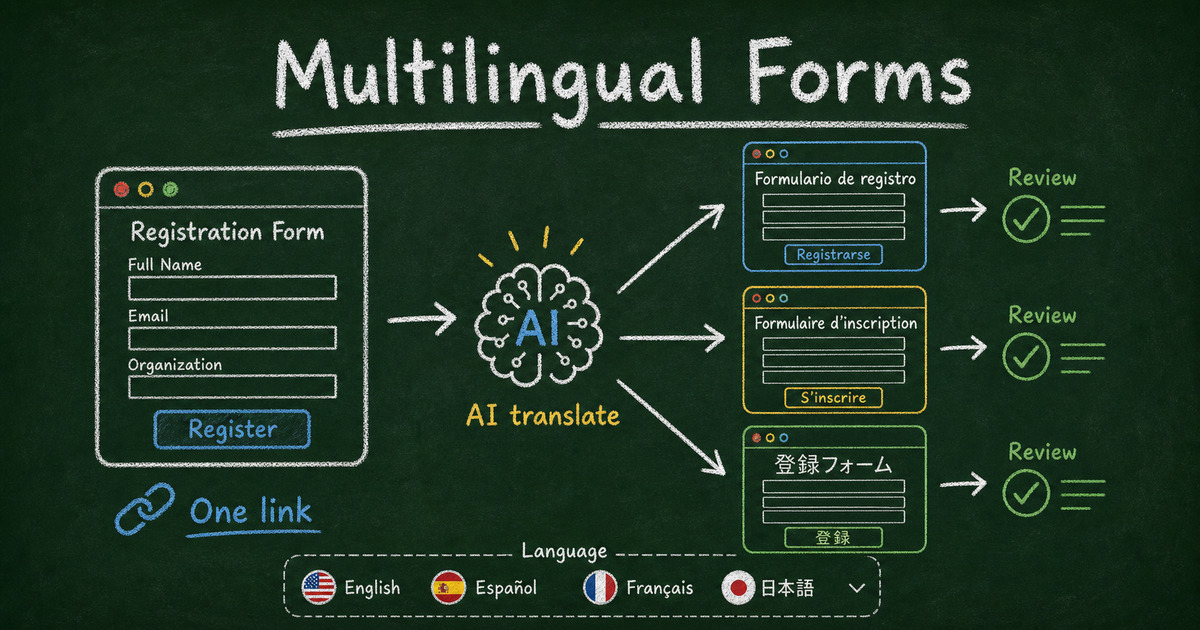
A multilingual registration form solves that problem by making the form itself language-aware. It does not ask every respondent to find a browser translation setting or guess whether a translated button belongs to the same workflow. It gives the form owner control over the wording and gives respondents a visible language choice.
TL;DR — A multilingual registration form lets one public signup form serve respondents in multiple languages while keeping responses in one place.
- One link — Share the same form URL across email, QR codes, websites, and community channels.
- AI first draft — Use AI translation to create language versions quickly, then review important wording before publishing.
- Respondent control — Match the respondent’s browser language when possible and keep a manual language selector visible.
- Works for: community programs, schools, clinics, nonprofits, events, workshops, volunteer applications, and customer onboarding.
- Native form translation is different from relying only on browser translation because the form owner can review and edit the wording.
What Is a Multilingual Registration Form?
A multilingual registration form is one online form that can display its questions, options, helper text, consent language, buttons, validation messages, and post-submit content in more than one language.
The key is that the form remains operationally single. You are not creating one form per language, one response sheet per language, and one set of links per audience. Respondents can see different language experiences, but the team still receives one coherent set of submissions.
That matters for registration workflows because signups usually need both accessibility and consistency. A school program, clinic, class, workshop, event, or nonprofit intake cannot afford to scatter responses across disconnected copies of the same form.
When a Multilingual Registration Form Is Worth Building
Not every form needs translation. A private internal form for a single-language team may be fine as-is.
The need appears when three conditions overlap: the audience is mixed-language, the form details matter, and the link will be shared broadly. We think of this as the Audience-Clarity-Distribution test.
Audience means some respondents may not read the source language comfortably. Clarity means misunderstanding a field could change the answer, the appointment, the payment, or the consent. Distribution means the form link will travel through email, chat, flyers, websites, QR codes, or partner organizations where you cannot predict every respondent’s language.
If all three are true, native translation is usually worth it.
Common examples include:
- Community health screening registration
- School and parent permission forms
- Public-service intake forms
- International event registration
- Nonprofit application and volunteer forms
- Employee onboarding across regions
- Customer feedback surveys for global audiences
We built the FormHug demo around a community health screening because it passes all three parts of the test. The audience may include families, older adults, and new residents. The wording matters. The same link may be shared by community partners, staff, and respondents.
What to Translate Before You Publish
The first mistake is translating only field labels.
For a registration form, the most important language often appears around the fields: helper text, answer options, consent statements, confirmation messages, validation errors, and instructions shown after submission.
Use the Critical Wording Pass before publishing:
- Review consent and privacy wording.
- Review eligibility requirements.
- Review date, time, location, and attendance instructions.
- Review options that affect scheduling, payment, screening type, or services requested.
- Review the post-submit message so respondents know what happens next.
This is where AI translation and human review should work together. AI can create the first version quickly. The form owner or a trusted reviewer should inspect the words that carry operational, legal, medical, or financial meaning.
In FormHug, content translation covers the form title, description, questions, options, help text, and post-submit content. Interface language covers built-in UI such as buttons, navigation, and validation messages.
Why One Form Link Is Better Than Separate Language Copies
Separate form copies look simple at first. One English form, one Spanish form, one Japanese form, one spreadsheet per form. The problem shows up later.
Links get forwarded to the wrong audience. Updates must be repeated across copies. A changed consent sentence may be fixed in one language but missed in another. Reporting becomes harder because responses live in separate places. QR codes and printed materials age badly when a form link changes.
One multilingual form keeps the workflow stable. The same public link can be shared on a website, in a newsletter, in a chat message, or on a printed flyer. The respondent gets the language experience that fits them, while the organizer keeps one form to maintain.
This is especially important when the registration form connects to follow-up work. If a registration later needs payment, email confirmation, Slack alerts, or a spreadsheet export, one form is easier to automate than a family of language-specific copies. For related workflow thinking, see our notes on FormHug Slack alerts and confirmation emails after form submission.
How FormHug Handles AI Form Translation
FormHug’s multilingual workflow is built around the idea that translation should start fast and remain reviewable.
When you add a content translation language, FormHug starts AI translation automatically. Each language can show a status such as translating or up to date, so you can tell what is ready to review. The review screen shows source text beside translated text, and you can manually edit individual translated fields before sharing the form.
Respondents open the same public form link for every language. If their browser language matches a translation you added, FormHug switches automatically. If no matching translation exists, the form falls back to the original language. Respondents can also use the language selector at the top of the public form.
The current workflow supports English, German, Spanish, French, Italian, Japanese, Korean, Portuguese (Brazil), Simplified Chinese, and Traditional Chinese.
For complete setup details, use the FormHug multilingual form docs.
How to Build a Multilingual Registration Form
Keep the build process focused on milestones, not clicks.
Step 1: Design the source registration form
Start with one clean source form in the language your team can maintain. Keep it short enough for mobile respondents and group the fields in the order people expect: identity, contact details, registration choices, support needs, and consent.
For a community screening form, that might mean full name, email address, phone number, preferred language, screening type, preferred time, interpreter need, notes before the visit, and consent.
Step 2: Decide which languages are truly needed
Do not add languages just to look comprehensive. Add the languages your audience is likely to use, then make sure someone can review the important wording.
If you are not sure where to start, look at the communities you serve, the languages used in support conversations, the languages in your printed materials, and the regions where the form will be shared.
Step 3: Generate and review translations
Turn on content translation, add languages, and let AI generate the first draft. Then run the Critical Wording Pass: consent, eligibility, dates, options, payment details, and post-submit instructions.
This review step is what turns translation from a convenience into a trustworthy registration experience.
Step 4: Test the public form before sharing
Open the public form, switch languages manually, and submit at least one test response. If possible, ask a fluent speaker to review the translated version before you publish the link widely.
Then share the same URL everywhere. For a working example, try the International Community Health Screening Registration demo.
Ready-Made Starting Points
If you are building a multilingual registration flow, start from the closest form pattern and adapt the language layer around it.
- Event Registration Form for conferences, workshops, webinars, and community events
- Volunteer Application Form for nonprofits and community programs
- Patient Intake Form for healthcare-style information collection
- Customer Feedback Survey for multilingual feedback across regions
Templates save time, but the translation review still matters. Treat the template as the structure, then make the language fit your real audience.
Frequently Asked Questions
How do you create a multilingual registration form?
Create one source registration form, add the languages your audience needs, use AI translation for the first draft, review important wording, then share one public link. The best multilingual form keeps responses in one place while giving respondents a language selector.
Can AI translate an online form automatically?
Yes. In FormHug, adding a content translation language triggers AI translation automatically. The form owner can then review and manually edit translated text before publishing the multilingual form.
Is a multilingual form better than browser translation?
Browser translation can help, but native form translation gives the form owner more control. The owner can review consent text, options, helper text, and post-submit content instead of relying only on a respondent’s browser settings.
Should I create separate forms for each language?
Usually no. Separate language copies create maintenance and reporting problems. One multilingual form is easier to share, update, automate, and analyze because every respondent uses the same public link.
What languages does FormHug support for multilingual forms?
The current workflow supports English, German, Spanish, French, Italian, Japanese, Korean, Portuguese (Brazil), Simplified Chinese, and Traditional Chinese.
What parts of a form should be translated?
Translate the form title, description, questions, answer options, helper text, consent wording, built-in buttons and validation messages, and content shown after submission. For important workflows, review the translation before sharing the form.
Can I use FormHug to build a multilingual form for free?
You can start building forms in FormHug and test the multilingual workflow from the product. For feature availability and current plan details, check the FormHug app or create your form.
Related
- One Form, Ten Languages: Introducing AI-Powered Multilingual Forms in FormHug — See the product update behind FormHug’s multilingual form workflow
- Event Registration Questions: What to Ask Before People Sign Up — Plan the fields and options that make a registration form easier to complete
- Patient Intake Form Templates: What to Ask Before the Appointment — Use healthcare-style intake patterns for sensitive information collection
- How to Send Emails to Form Submitters Automatically — Add confirmation and follow-up emails after people register
Every registration form that assumes one language quietly asks some people to work harder before they can say yes. Create your multilingual form ->

Written by
FormHug TeamProduct, research, and form automation team
The FormHug Team brings together product builders, workflow researchers, and form automation practitioners who study how people collect, route, and act on information online. Our guides are based on hands-on product testing, template analysis, customer workflow patterns, and deep experience with forms, surveys, quizzes, AI-assisted creation, integrations, and results sharing.