A Form Product Does Not Need Every Integration
Create with AI
Describe the workflow and get a form draft
Use FormHug to create forms from prompts, then share, automate, and reuse the structured responses.
There is a strange pressure on workflow products to become integration museums.
Every new logo feels like progress. Every marketplace badge feels like proof. Every “connects with 5,000 apps” line sounds impressive on a pricing page. But if you build forms long enough, the question starts to change.
It is not “How many integrations can we list?”
It is “What actually needs to happen after someone submits a form?”
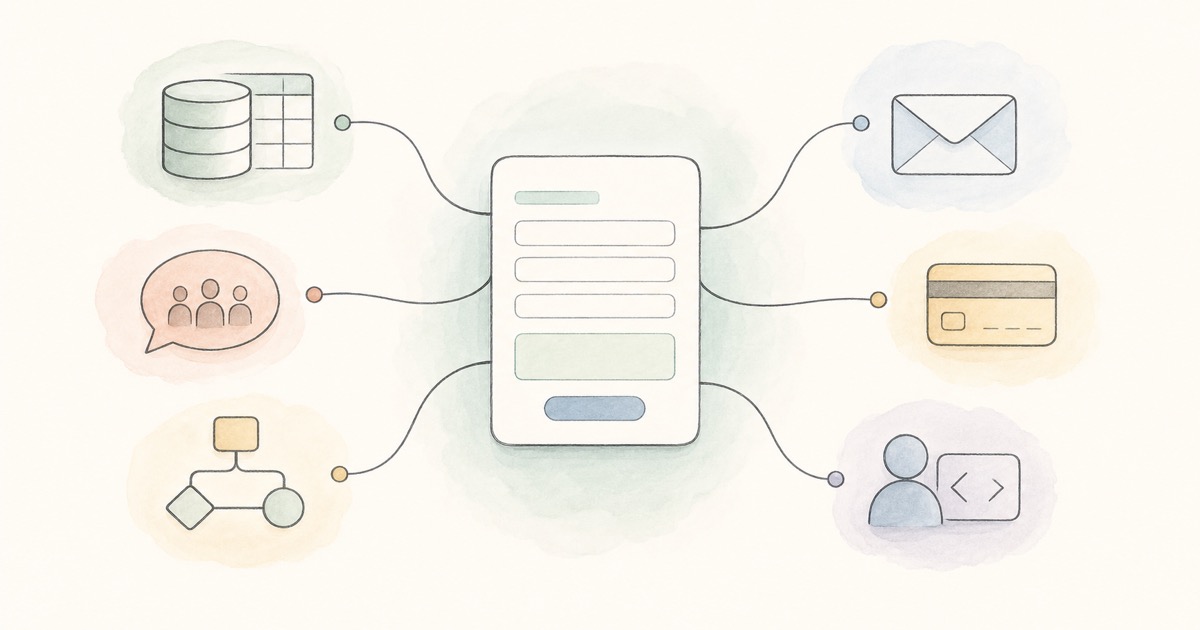
For a form product, that answer is smaller and sharper than people think. A form collects structured human input. After submission, the response usually needs one of a few exits: become a record, alert a person, trigger an automation, send an email, collect a payment, reach a custom system, or enter an agent workflow.
That is the integration layer a form product really needs: not every possible destination, but the few exits that preserve the shape of the submission as work moves forward.
The Job Is Not App Coverage. It Is Workflow Continuity.
Most forms are not isolated artifacts. They are front doors.
A waitlist form is the front door to a launch process. A customer feedback form is the front door to product research. A support intake form is the front door to a triage workflow. A paid registration form is the front door to an event, a class, or a service relationship.
The mistake is treating the integration as a feature that sits beside the form. In practice, the integration is part of the form’s promise.
If the data stays trapped in the form tool, someone has to remember to check it. If the right person never sees it, the form did not really finish the job. If the respondent gets no credible follow-up, the experience feels incomplete. If the next system cannot read the data, the structured input loses its usefulness.
The form does not end at submit. Submit is where the workflow begins.
The Essential Exits Framework
We keep coming back to a simple map: after submission, form data needs a small number of reliable exits. We think of this as the Essential Exits Framework: records, alerts, automation, email identity, payments, and system interfaces.
Records are for memory. Google Sheets and Notion are different expressions of the same need: “Put this response somewhere the team can review, filter, and work with later.” A spreadsheet is fast and familiar. A Notion database gives each submission a richer page and collaboration context. We wrote about the Notion side in FormHug Notion Integration.
Alerts are for attention. Some responses should not wait for a dashboard visit. A demo request, urgent support issue, event update, or application signal should reach the person who can act. That is the role of Slack alerts, covered in FormHug Slack Integration.
Automation is for everything that does not deserve a native integration yet. Zapier is valuable because no product team can predict every downstream stack. Some teams need HubSpot. Some need Mailchimp. Some need Airtable, filters, formatter steps, and a delayed follow-up. The point is not the Zapier logo. The point is letting the form trigger a workflow outside the form product. That is the argument behind FormHug Zapier Integration.
Email identity is for trust. Many form workflows need email after submission: reminders, manual follow-up, confirmations, and operational messages. When that email comes from the organization’s own sender, it feels more connected to the relationship. That is why SMTP matters, even though it is less glamorous than a giant app marketplace. The product note is here: FormHug SMTP Integration.
Payments are for forms that are also transactions. Tickets, donations, deposits, orders, paid applications, and service bookings all need the payment to live with the submission. Otherwise the team is reconciling a form entry against a separate payment record. For a practical version, see how to create a payment form.
System interfaces are for tools that should not be forced through a dashboard. Webhooks let developers receive JSON. MCP lets AI agents create, read, and operate on FormHug resources. These are not decorative integrations. They are interfaces for other systems to treat forms as part of a larger workflow. The agent-facing side is covered in FormHug MCP for AI Agents.
That is enough to cover the core shape of the category. A future integration can still be valuable, but it should deepen one of these exits instead of merely expanding the logo grid.
More Integrations Can Make the Product Worse
This is the uncomfortable part: more integrations can make a product harder to understand.
Every integration adds surface area. It adds setup paths, permissions, edge cases, support questions, docs, auth failures, stale mappings, rate limits, and product decisions about how much of another system’s complexity to expose.
If the integration does not map to a common job after form submission, it can become a distraction. The product starts to say, “Look how many places we connect,” instead of “Here is how your workflow keeps moving.”
This is not an argument against integrations. It is an argument for earning them. A good integration should answer a user sentence that already exists: “Put this in our database,” “tell the team,” “charge the attendee,” “send from our domain,” “give this to our backend,” or “let my agent work with it.”
For users, that difference matters.
A small business owner does not want an integration wall. They want to know where the lead goes. A program coordinator does not want to choose from a hundred apps. They want registrations in the right place, alerts to the right team, payments attached, and follow-up emails that look legitimate. A developer does not want a brittle workaround. They want a webhook or tool interface that behaves predictably.
The right integration set should make the product feel calmer, not bigger.
The Integrations Overview Is Really a Decision Map
Our help center has an Integrations Overview page, and its job is practical: help users choose the right setup guide.
But underneath that table is a product philosophy.
The table is not organized around app logos. It is organized around goals:
- Store responses
- Create database pages
- Alert a team
- Automate across apps
- Send from a verified email sender
- Collect payments
- Send JSON to a custom endpoint
- Let AI agents operate on forms
That is the shape we care about. The destination app matters, but the user’s real question is usually a workflow question: “Where should this response go, and what should happen next?”
When the integration page answers that question, it becomes more than documentation. It becomes a map of what a modern form product is responsible for.
Where FormHug Is Drawing the Line
FormHug is not trying to become an all-purpose automation suite. That would make the product larger in the wrong direction.
We want FormHug to be the form layer: the place where humans submit structured information, and where teams, tools, and agents can reliably act on that information afterward.
That means the core integration layer should be boring in the best way.
Submissions should sync to work tools. Important responses should notify people. Common downstream workflows should be possible without code. Emails should be able to come from a sender the respondent recognizes. Payments should stay connected to the form entry. Developers should have a webhook. Agents should have MCP.
Everything else should earn its place by making one of those jobs meaningfully better.
This is also why the agent layer matters. In an AI workflow, a form is not just a web page. It is a structured interface that an agent can create, inspect, read, and route. The integration layer is what keeps that structure useful after collection. Without it, an agent can help make the form, but the data still gets stuck in the wrong place.
We wrote the broader version of that idea in AI Forms for Humans and Agents: humans need forms that feel trustworthy, and agents need structured inputs they can act on.
Other Directions Worth Exploring
There are still useful integration ideas beyond the current set. The test is whether they strengthen a real post-submission job rather than adding another logo.
Calendar handoff could matter for booking-heavy forms where a submission should become a scheduled event or follow-up reminder.
CRM-native enrichment could matter if lead capture becomes a larger FormHug cluster, especially when teams need deduplication, lifecycle stages, and owner assignment.
Data warehouse export could matter for larger teams that want form submissions in analytics pipelines rather than spreadsheets.
Two-way status sync could matter for application, request, and support workflows where the status changes outside FormHug but should remain visible to the respondent or team.
Agent playbooks could matter more than another app connector. Instead of “connect to X,” the product might offer opinionated workflows: “new lead to Slack and Notion,” “paid registration to email and Sheets,” or “research response to Notion and summary agent.”
Integration recipes could make the existing layer easier to adopt. A user choosing between Notion, Slack, Zapier, SMTP, Stripe, Webhooks, and MCP may not want another connector. They may want a recommended bundle for a real scene: waitlist, paid event, support intake, research survey, or application review.
Those are all interesting. But they are interesting because they deepen the workflow, not because they expand the logo grid.
The best form integrations are not the most numerous. They are the ones that make a submission keep its shape as it moves from person, to team, to system, to agent.

Written by
FormHug TeamProduct, research, and form automation team
The FormHug Team brings together product builders, workflow researchers, and form automation practitioners who study how people collect, route, and act on information online. Our guides are based on hands-on product testing, template analysis, customer workflow patterns, and deep experience with forms, surveys, quizzes, AI-assisted creation, integrations, and results sharing.