Patient Intake Form Templates for Clinics, Therapists, and Coaches
Start from a template
Use a ready-made form structure
Pick a registration, booking, intake, application, or order template and customize it for your workflow.
A patient intake form has one job: collect enough context before the visit so the appointment can start with care, not paperwork.
The hard part is balance. Ask too little and the provider spends the first ten minutes filling gaps. Ask too much and the patient delays, abandons the form, or rushes through sensitive answers. The best patient intake forms are clear, respectful, and scoped to the kind of care being provided.
This guide covers what should be on a patient intake form, how intake differs for clinics, therapists, coaches, telehealth, fitness, and nutrition, and which FormHug templates give you a strong starting point.
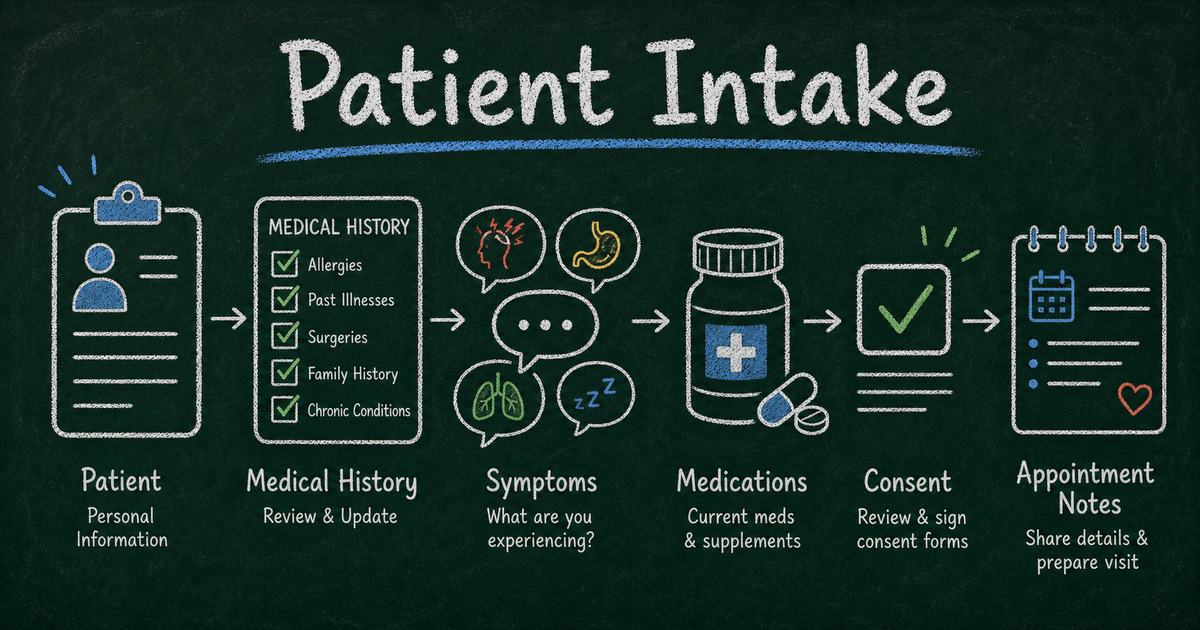
TL;DR - A patient intake form should collect identity, contact details, appointment reason, relevant history, current symptoms, medications, allergies, emergency contact, and consent.
- Match the form to the practice - therapy, telehealth, coaching, nutrition, and fitness intake need different questions.
- Use conditional logic - show follow-up questions only when the answer requires detail.
- Treat health data carefully - confirm your privacy, security, HIPAA, and local compliance needs before collecting protected health information.
- Works for: clinics, therapists, health coaches, nutritionists, wellness providers, fitness trainers, and telehealth teams.
- FormHug templates help you start with the right structure instead of a blank form.
What Is a Patient Intake Form?
A patient intake form is a pre-appointment questionnaire that collects personal information, health background, reason for visit, consent, and any context the provider needs before seeing the patient.
It is different from a general contact form. A contact form asks, “How can we reach you?” A patient intake form asks, “What do we need to know before care begins?”
For a broader framework, read how to create an intake form. For appointment scheduling, pair intake with online booking form patterns.
What Should Be on a Patient Intake Form?
Use this baseline:
| Section | Fields |
|---|---|
| Patient identity | legal name, preferred name, date of birth |
| Contact details | email, phone, address |
| Appointment context | reason for visit, preferred provider, appointment type |
| Health history | conditions, surgeries, hospitalizations |
| Current health | symptoms, pain level, onset date |
| Medications | current medications, dosage, supplements |
| Allergies | drug, food, environmental allergies |
| Emergency contact | name, relationship, phone |
| Consent | privacy notice, treatment consent, telehealth consent if relevant |
| Files | referrals, prior records, insurance card if appropriate |
Do not collect every possible health detail by default. Ask what the provider actually needs for the first visit.
Patient Intake Form Templates by Use Case
General clinic intake
Use the Patient Intake Form for clinics that need a broad baseline: contact information, medical history, medications, allergies, current symptoms, and consent.
Keep this form organized into short sections. A single long page of medical questions feels heavier than the same questions grouped by topic.
Telehealth intake
Use the Telehealth Intake Form when the visit happens remotely. In addition to normal intake fields, ask about:
- preferred contact method;
- location during the appointment;
- technology access;
- telehealth consent;
- emergency contact and local emergency instructions.
Telehealth forms should also explain what happens if the video call fails.
Therapy intake
Use the Therapy Intake Form for counseling or mental health practices. Therapy intake usually needs more context than general wellness intake:
- presenting concerns;
- prior therapy experience;
- mental health history;
- medications;
- risk and safety questions;
- emergency contact;
- consent and confidentiality terms.
Be especially careful with privacy language here. The form should feel safe, not interrogative.
Coaching intake
Use the Coaching Intake Form for health, life, executive, or wellness coaching. A coaching intake form usually asks about goals, current challenges, desired outcomes, schedule, and commitment level.
Coaches should avoid making the form sound clinical unless they are licensed and operating in a clinical context.
Fitness and nutrition intake
Use the Fitness Intake Form for training programs and the Nutrition Intake Form for diet or nutrition services.
Fitness forms often need injury history, exercise readiness, goals, schedule, and liability acknowledgement. Nutrition forms need allergies, dietary restrictions, preferences, medical conditions, and eating patterns.
How to Create a Patient Intake Form
Step 1: Choose the care context
Start by choosing the form type: clinic, therapy, coaching, telehealth, fitness, nutrition, wellness, or another specialty. The context determines what is essential.
Step 2: Group fields by patient mental model
Patients do not think in database categories. They think in simple sections:
- About you
- Your appointment
- Your health history
- Current concerns
- Consent and privacy
Use section headings that make the next step obvious.
Step 3: Use conditional logic for sensitive follow-up
Do not show every detail field to everyone. If the patient selects “Yes” for allergies, then ask for allergy details. If they select “No,” move on.
Conditional logic reduces form length and makes sensitive questions feel more relevant.
Step 4: Add consent text close to submission
Consent should not be hidden in a paragraph at the top. Place key consent acknowledgements near the end, before submission, and use required checkboxes where appropriate.
Step 5: Test the form as a patient
Complete the form on a phone. Check whether the longest questions fit, whether help text is clear, and whether required fields are justified. If it feels exhausting, trim.
Privacy and Compliance Notes
Patient intake can involve protected or sensitive health information. Before collecting health data, confirm:
- whether HIPAA or another privacy law applies to your organization;
- whether your form, storage, access controls, and data-sharing practices meet your obligations;
- whether staff permissions are scoped correctly;
- how long submissions are retained;
- whether patients understand what they are submitting.
This article is a form-design guide, not legal or compliance advice. If you collect protected health information, review your setup with the appropriate legal, privacy, or compliance professional. We recommend treating patient intake as a privacy workflow first and a form-design workflow second.
Frequently Asked Questions
What should a patient intake form include?
It should include patient identity, contact details, appointment reason, relevant history, current symptoms, medications, allergies, emergency contact, and consent.
How long should a patient intake form be?
Long enough to prepare for the first visit, but no longer. For many clinics, 5 to 10 minutes is a reasonable target. Therapy and complex medical intake may need more.
Can I use one intake form for all services?
You can, but it is usually better to create variants. A telehealth intake, therapy intake, and fitness intake should not ask the exact same questions.
What is the difference between patient intake and client intake?
Patient intake usually collects health context, symptoms, medications, allergies, consent, and privacy acknowledgements. Client intake usually focuses on goals, project context, budget, timeline, and service fit.
Should patient intake forms be online?
Online forms reduce waiting-room paperwork and help providers review context earlier. Just make sure your privacy, security, and compliance requirements are covered.
Can I start from a FormHug patient intake template?
Yes. FormHug includes patient, telehealth, therapy, coaching, fitness, and nutrition intake templates so you can start from the closest workflow and remove fields you do not need.
Related
- How to Create an Intake Form — a broader intake-form framework for healthcare, coaching, business, and service workflows.
- Client Intake Software: What to Look For — how to evaluate intake tools when submissions need review and follow-up.
- How to Create an Online Booking Form — pair intake forms with appointment scheduling and booking requests.
- How Many Questions Should a Survey Have? — use this to keep intake forms complete without making them exhausting.
A good patient intake form makes care easier before the appointment begins. Start with a template, trim what you do not need, and protect the information people trust you with. Create your form →

Written by
FormHug TeamProduct, research, and form automation team
The FormHug Team brings together product builders, workflow researchers, and form automation practitioners who study how people collect, route, and act on information online. Our guides are based on hands-on product testing, template analysis, customer workflow patterns, and deep experience with forms, surveys, quizzes, AI-assisted creation, integrations, and results sharing.