One Form, Ten Languages: Introducing AI-Powered Multilingual Forms in FormHug
Create with AI
Describe the workflow and get a form draft
Use FormHug to create forms from prompts, then share, automate, and reuse the structured responses.
One public form link should not assume one public language.
A community registration form may serve parents, older adults, new residents, students, volunteers, and staff who do not all read the same language comfortably. An international event form may travel across regions before the organizer knows who will open it. A customer feedback survey may be shared with people whose browser, inbox, and day-to-day work happen in different languages.
Browser translation can help in a pinch. But important form workflows need something more predictable: translated questions, translated options, translated consent text, translated post-submit content, and a visible way for respondents to choose the language they trust.
We built multilingual forms in FormHug so teams can create one form, add the languages their audience needs, review the translated text, and share one link with everyone.
Try the Multilingual Demo Form
The fastest way to understand the workflow is to open the same form and switch languages yourself. This demo is an international community health screening registration form, built to show browser-language matching, one public link, and the respondent-facing language selector.
Open the multilingual health screening form in a new tab ->
What Changed
FormHug now supports multilingual public forms with two language layers.
The interface language controls built-in form UI, such as buttons, navigation, and validation messages. The content translation layer covers the words the form owner writes: the form title, description, questions, answer options, helper text, and the content shown after submission.
When a form owner adds a content language, FormHug starts AI translation automatically. The owner can then review the translated text and manually edit individual fields before sharing the form.
The current workflow supports 10 languages: English, German, Spanish, French, Italian, Japanese, Korean, Portuguese (Brazil), Simplified Chinese, and Traditional Chinese.
For the full settings reference, use the FormHug language settings docs. For a concrete walkthrough, see the multilingual form guide.
One Link, Multiple Language Experiences
The most practical part of multilingual forms is that the distribution model does not change.
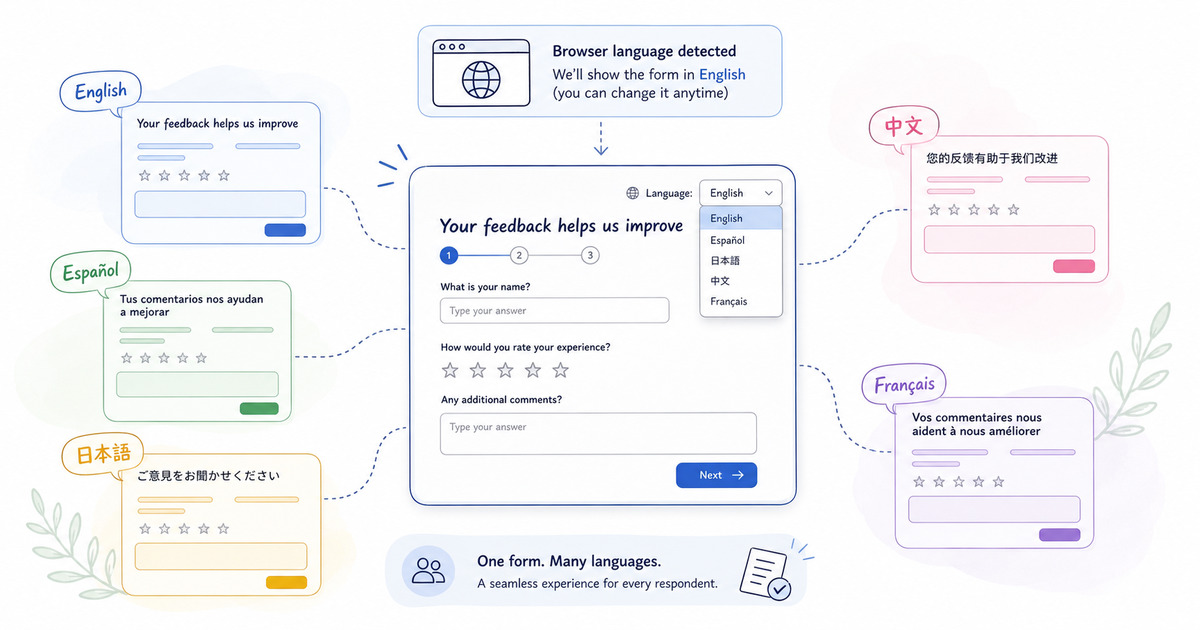
You do not need one English link, one Spanish link, one Japanese link, and one spreadsheet trying to reconcile which audience saw which version. Respondents open the same public form URL. FormHug checks the respondent’s browser language and switches automatically when a matching translation exists.
If no matching translation exists, the form falls back to the original form language. Respondents can also choose another language manually from the selector at the top of the public form.
That matters because form distribution is already messy. Links get forwarded, posted in chat, embedded in websites, printed as QR codes, and shared by people who may not know which language the next respondent prefers. One link keeps the operational side simple while still giving respondents a language-aware experience.
This is the same product direction behind our broader work on AI forms for humans and agents: the form should remain structured for the system, but understandable for the person filling it out.
Why Native Form Translation Matters
Browser translation is useful, and we do not think teams should pretend it does not exist. The point of native form translation is control.
When the form itself owns the language experience, the owner can review important wording before publishing. That is especially important for consent statements, eligibility requirements, screening questions, payment details, event logistics, and anything that affects whether a respondent gives accurate information.
Native translation also makes the language choice visible. A respondent does not have to know how to trigger browser translation, trust that every field translated correctly, or wonder whether the submit button and validation messages belong to the same experience as the questions.
For lightweight forms, that may feel like a small detail. For community programs, public-service intake, school forms, health screenings, international events, and support workflows, it can be the difference between “I can complete this” and “I need someone else to help me.”
Why We Chose a Health Screening Demo
We built the same short demo, International Community Health Screening Registration, to make the workflow concrete.
The form collects the essentials: full name, email, phone number, preferred language, screening type, preferred time, interpreter needs, notes before the visit, and consent. It is intentionally short because the point is not to show a complex form. The point is to show how one important public workflow can become easier to complete across languages.
This scenario is deliberately not a global SaaS registration form. It is more ordinary and more important. A family signing up for a screening, a new resident looking for support, or an older adult helping someone else register should not have to fight the page before they can answer basic questions.
That is also why this update pairs well with practical form patterns such as patient intake form templates, event registration questions, and volunteer application forms. The more public the audience, the more language becomes part of the form’s usability.
How It Works
The setup has four conceptual steps.
Step 1: Choose the original form language
Start with the language you will use to write and maintain the source form. This is the language your team can review most confidently.
Step 2: Add the languages your audience needs
Turn on content translation and add the languages that match your likely respondents. FormHug begins AI translation automatically and shows translation status so you can see what is still processing and what is up to date.
Step 3: Review the important wording
AI translation speeds up the first draft, but review still matters. Check fields that affect consent, eligibility, legal wording, health details, payment details, and logistics. The review screen lets you compare source text with translated text and edit translations manually.
Step 4: Share one public link
Once the translations are ready, share the same public form link everywhere. FormHug handles browser-language matching and gives respondents the manual language selector on the public form.
The click-by-click setup lives in the multilingual form docs, so the blog can stay focused on the workflow decisions.
Who This Helps
Multilingual forms help any team that collects information from people who may not share a primary language.
Community organizations can make health screenings, resource requests, and program registrations easier to complete. Schools can support parents and guardians who do not read the school’s default language comfortably. Nonprofits can collect applications and volunteer information across mixed-language communities. Event teams can use one registration link for international attendees. Customer teams can share feedback forms across regions without creating separate forms for every market.
It also helps small teams because the workflow stays operationally simple. One form, one link, one submissions table, multiple respondent-facing languages.
That is the product decision underneath the feature. Multilingual support should reduce friction for respondents without multiplying the form owner’s work.
Next Step
If you already have a public form that serves more than one language group, start with the fields where misunderstanding would hurt most: consent, eligibility, date/time choices, payment details, and open-ended notes.
Then add the languages your audience actually needs, review the translations, and share one link with everyone. Read the language settings reference, try the community health screening demo, or create a multilingual form in FormHug.

Written by
FormHug TeamProduct, research, and form automation team
The FormHug Team brings together product builders, workflow researchers, and form automation practitioners who study how people collect, route, and act on information online. Our guides are based on hands-on product testing, template analysis, customer workflow patterns, and deep experience with forms, surveys, quizzes, AI-assisted creation, integrations, and results sharing.