How to Create a Membership Sign-Up Form with Payment
Build the paid workflow
Collect payment with the form
Turn the registration, order, booking, or donation flow into a payment-ready FormHug form.
A membership signup is not just a payment. It is a profile, a plan choice, an agreement, and a first operational record.
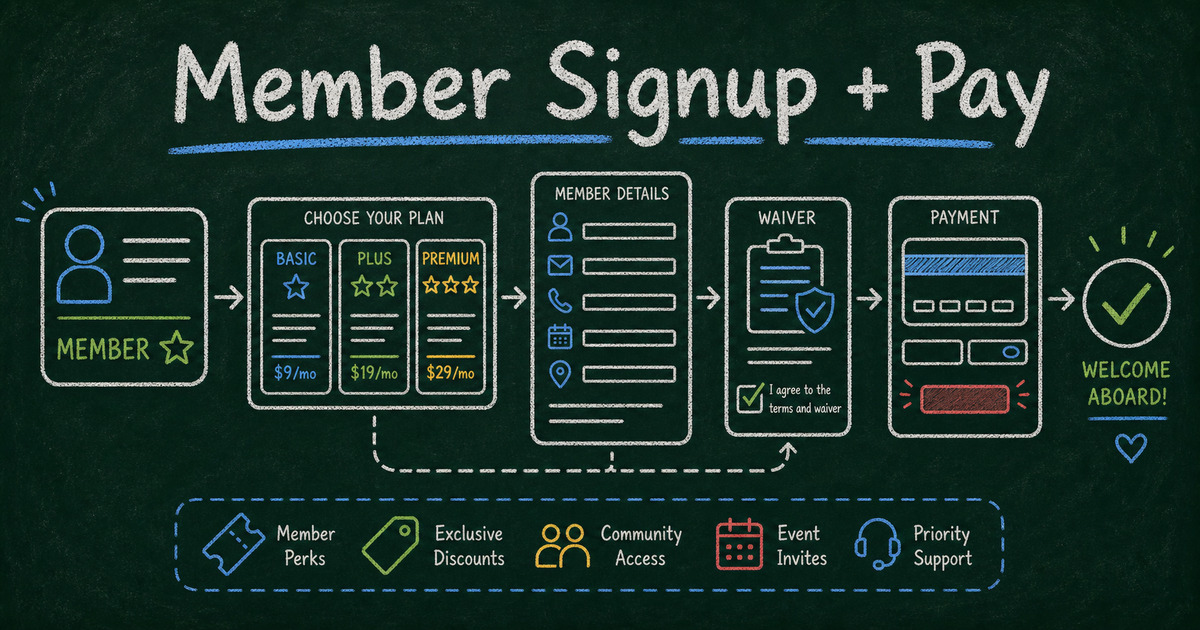
That is why a plain payment link often falls short. It can collect money, but it may not collect the member’s details, tier, eligibility, emergency contact, waiver, mailing preferences, or onboarding answers. A membership sign-up form with payment collects everything in one submission.
This guide shows how to create a membership sign-up form that collects member information and payment together, when to use one-time dues versus plan options, and how to keep the form short enough for people to finish.
TL;DR - A membership sign-up form with payment should collect member details, membership tier, price, contact preferences, waivers or terms, optional eligibility details, and Stripe payment in one flow.
- Use a form when context matters - membership usually needs more than a dollar amount.
- Show plan choices clearly - use simple tiers, benefits, and total due before checkout.
- Collect agreements before payment - waivers, terms, refund policy, and eligibility should be acknowledged before submission.
- Works for: clubs, nonprofits, communities, gyms, classes, associations, studios, and local groups.
- FormHug payment fields let you add Stripe checkout to a membership form.
What Is a Membership Sign-Up Form with Payment?
A membership sign-up form with payment is an online form where a person enters their membership information, chooses a plan or fee, agrees to any terms, and pays before the submission is completed.
It is different from a payment link because the form collects structured member data. It is different from a full membership platform because it focuses on signup, dues, and intake rather than ongoing member portals.
For the payment mechanics, read how to create a payment form. For non-payment signup examples, see best registration form templates.
What to Include in a Membership Sign-Up Form
Use this baseline:
| Section | Fields |
|---|---|
| Member details | name, email, phone |
| Membership type | individual, family, student, business, supporter |
| Plan or dues | tier, price, quantity if needed |
| Eligibility | age, location, affiliation, student status |
| Emergency contact | useful for gyms, clubs, and youth programs |
| Preferences | newsletter, directory listing, volunteer interest |
| Agreements | terms, waiver, refund policy, code of conduct |
| Payment | Stripe checkout through a product field |
| Confirmation | receipt, next steps, onboarding instructions |
Do not make every membership form complex. A community newsletter membership may need only name, email, tier, and payment. A sports club may need emergency contact and waiver fields.
How to Create a Membership Sign-Up Form with Payment
Step 1: Decide what kind of membership you sell
Common models:
- annual dues;
- one-time lifetime membership;
- family membership;
- event or season membership;
- class or studio membership;
- nonprofit supporter membership;
- student or discounted membership.
Your model determines the payment field. If you sell a simple fixed fee, use one product. If you sell tiers, use options.
Step 2: Create the member profile fields
Ask only for information you need immediately:
- full name;
- email;
- phone if your team uses it;
- address only if shipping, local eligibility, or official records require it;
- organization or affiliation if relevant.
Avoid asking for birthdate, ID, employer, or demographic information unless it is needed for eligibility, safety, or reporting.
Step 3: Add membership tiers or dues
Use clear plan labels:
| Tier | Example |
|---|---|
| Individual | $99 per year |
| Family | $149 per year |
| Student | $49 per year |
| Supporter | $250 per year |
Describe benefits briefly. If the description takes a paragraph, put it on the page before the form and keep the form itself simple.
Step 4: Add payment fields
In FormHug, a product field can turn a form into a Stripe payment form. Use:
- a product field for one or more membership products;
- a text option field for plan tiers;
- a price-only field for a fixed deposit or fee;
- a text product field for simple paid services or dues.
For memberships with recurring subscriptions, confirm the payment setup you need before publishing. Some organizations only need annual dues collected once; others need subscription billing, renewals, proration, or cancellation management.
Step 5: Add agreements before checkout
Put waivers, terms, refund policy, and code of conduct acknowledgements before the payment step. A member should understand what they are agreeing to before they pay.
Use short required checkboxes:
- I agree to the membership terms.
- I understand the cancellation or refund policy.
- I agree to the code of conduct.
- I confirm this information is accurate.
Step 6: Write a useful confirmation message
After payment, the member should know:
- whether the membership is active immediately;
- whether approval is required;
- when they will receive access or materials;
- who to contact with questions;
- whether a receipt is coming from Stripe.
That confirmation message saves a surprising number of follow-up emails.
Membership Form Templates
Basic membership registration
Start with the Membership Registration Form Template when someone becomes a member immediately after signup.
Paid membership or dues
Start with the Payment Form Template when collecting a fixed fee, dues, deposit, or donation-like membership payment.
Course or class membership
Use the Course Registration Form Template when membership is tied to a structured class, cohort, or program.
Event-based membership
Use the Event Registration Form Template when membership signup happens alongside an event, conference, or local program.
Payment and Policy Notes
Membership payments can create operational obligations. Before publishing, confirm:
- whether payment is one-time or recurring;
- whether refunds are allowed;
- whether membership starts immediately or after approval;
- whether taxes, invoices, or receipts are required;
- who can access payment and member records;
- how renewals are handled.
Stripe handles card processing in FormHug payment forms. Card data should not be collected in ordinary text fields. We built FormHug payment fields so membership teams can collect the member record and payment status together without storing card numbers themselves.
Frequently Asked Questions
Can I collect membership fees through a form?
Yes. Add payment fields to a membership signup form so the member chooses a tier, enters details, agrees to terms, and pays in one flow.
Should I use a payment link or a membership form?
Use a payment link when all you need is money. Use a membership form when you need profile details, eligibility, plan choice, waivers, preferences, or onboarding information.
Can a membership form include waivers?
Yes. Add required checkbox acknowledgements for waivers, terms, refund policy, or code of conduct. For legal enforceability, have your wording reviewed.
Should membership payment be one-time or recurring?
Use one-time payment for dues, deposits, annual fees, and event-linked memberships. Use recurring billing only when you have a clear renewal, cancellation, and subscription-management process.
Can membership forms support multiple tiers?
Yes. Use plan options or product fields for tiers such as individual, family, student, supporter, or business membership.
Does FormHug store card details for membership payments?
No. Stripe handles card processing for FormHug payment forms, and the form submission records the member details and payment status instead of storing card numbers.
Related
- How to Create a Payment Form with Stripe — learn how FormHug payment fields connect form submissions and Stripe checkout.
- Best Registration Form Templates — compare signup templates for members, courses, events, and workshops.
- How to Create an Online Application Form — use this when membership requires review before approval.
- 13 Free Order Form Templates with Online Payment — see payment-form patterns for orders, services, tickets, and dues.
A membership form with payment gives you a paid signup and a useful member record at the same time. That is the difference between collecting dues and actually onboarding a member. Create your form →

Written by
FormHug TeamProduct, research, and form automation team
The FormHug Team brings together product builders, workflow researchers, and form automation practitioners who study how people collect, route, and act on information online. Our guides are based on hands-on product testing, template analysis, customer workflow patterns, and deep experience with forms, surveys, quizzes, AI-assisted creation, integrations, and results sharing.