How to Build an AI Workflow That Collects Structured Input from People
Create with AI
Describe the workflow and get a form draft
Use FormHug to create forms from prompts, then share, automate, and reuse the structured responses.
Most AI workflow diagrams show the agent, the model, the tools, and the database. They often skip the hardest part: getting clean input from people.
People do not submit information in JSON. They send partial emails, answer in chat, forget required details, attach the wrong files, or describe five different problems in one paragraph. An AI agent can interpret some of that, but a production workflow needs better input boundaries.
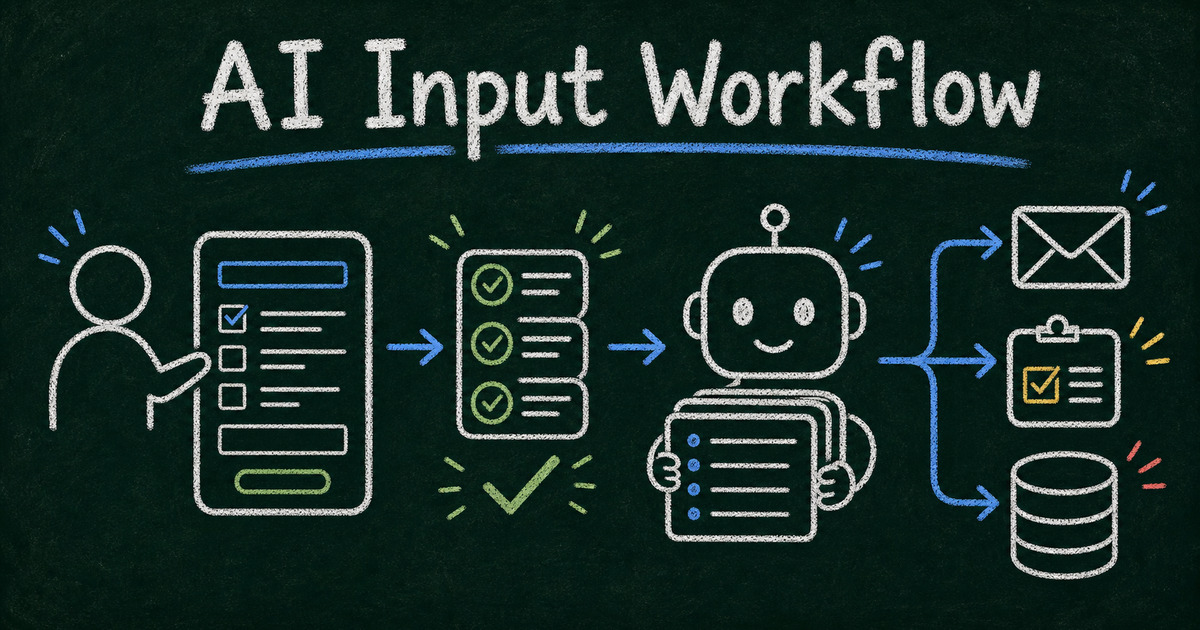
The easiest way to make an AI workflow reliable is to put a form at the human-input step. The form collects structured answers. The agent reads the submissions. The downstream system gets data that is clean enough to act on.
TL;DR - An AI workflow that collects input from people should use forms for structured collection, agents for reasoning, and explicit routing rules for next steps.
- Use forms at the boundary - the human submits a validated record before the AI acts.
- Keep the agent downstream - let the AI summarize, score, route, or draft follow-up after the submission exists.
- Design fields for decisions - every required field should change routing, scoring, personalization, or fulfillment.
- Works for: intake, lead qualification, volunteer applications, research panels, support triage, booking, and internal approvals.
- FormHug MCP lets agents create forms and read submissions without building custom form infrastructure.
What Is an AI Workflow with Structured Input?
An AI workflow with structured input is a process where a person submits information through a form, and an AI agent uses that submission to make a decision, draft a response, route the request, or update another system.
The form does not replace the AI. It gives the AI a better starting point.
For example:
| Use case | Human input | AI output |
|---|---|---|
| Client intake | goals, timeline, budget, files | kickoff summary and risk flags |
| Lead qualification | need, company, urgency, budget | score and recommended follow-up |
| Volunteer application | availability, skills, consent | role match and shift shortlist |
| Support request | issue type, account, screenshots | triage label and draft reply |
| Research study | screening answers | eligible or ineligible decision |
This is the same pattern behind AI agent workflows needing a form layer. Forms capture the record. Agents interpret the record.
Why Chat Alone Is Not Enough
Chat feels flexible, but flexibility is also the problem. If your AI workflow depends on a person answering six specific questions, chat makes it too easy to miss one.
Structured forms give you:
- required fields;
- specific answer types;
- dropdowns and choices;
- file uploads;
- consent text;
- payment or booking fields;
- one submission record per person.
That structure is what lets the agent work consistently. A model can summarize messy text, but it should not have to guess whether a respondent agreed to terms or selected the right service tier.
If you are building an agent-first workflow, read FormHug MCP for AI agents. If you are choosing a form builder for AI workflows, start with best AI form builder tools.
The Human, Form, Agent, System Model
Use four layers:
| Layer | Responsibility |
|---|---|
| Human | provides context, choices, consent, and files |
| Form | validates and stores the submission |
| Agent | summarizes, scores, routes, drafts, or enriches |
| System | sends email, updates CRM, schedules work, or creates tasks |
Keep those responsibilities separate. When every layer does one job well, the workflow is easier to test and explain.
Bad workflow
The agent asks the user questions in chat, tries to remember the answers, guesses missing fields, and sends an email.
Better workflow
The agent creates a FormHug form, sends the link, waits for a submission, reads the completed record, then drafts the email based on validated fields.
The second workflow is slower by one step, but it is much more reliable.
How to Build an AI Workflow That Collects Structured Input
Step 1: Define the decision the AI needs to make
Do not start by listing fields. Start with the decision:
- Should this lead get a sales call?
- Which volunteer role fits this person?
- Is this patient intake complete enough for review?
- Which support queue should handle this request?
- What follow-up message should be sent?
If a field does not help the decision, make it optional or remove it.
Step 2: Turn decision inputs into form fields
Convert each decision input into the least ambiguous field type.
| Need | Better field type |
|---|---|
| choose one path | single select |
| select several capabilities | checkbox group |
| explain context | long text |
| provide proof or files | file upload |
| choose time | date or booking field |
| confirm consent | required checkbox |
Avoid making the AI parse everything from one long textarea. That creates work for the model and uncertainty for your team.
Step 3: Add validation before AI processing
Validation is cheaper before the agent runs. Require the email field. Use predefined choices where possible. Add helper text for fields people commonly misunderstand.
The goal is not to make the form long. It is to make the submission complete enough that the agent does not need to ask for basics later.
Step 4: Connect the agent to submissions
With FormHug MCP, an AI agent can create forms and read submissions directly. We built the MCP workflow around real form operations, not only form generation, because the useful part is the full loop: create the form, collect the response, then act on the submission.
Either way, design the agent prompt around a submission record:
Given this submission, classify urgency, summarize the request in three bullets, identify missing information, and recommend the next step.
That prompt is much safer than:
Talk to the user and figure out what they need.
Step 5: Keep the human review point visible
Some workflows can be automated end to end. Many should not be.
Add human review when the workflow involves healthcare, legal advice, hiring, financial decisions, safety, refunds, account access, or anything that changes a person’s opportunity or treatment.
The AI can summarize and recommend. The human can approve.
What to Ask in the Form
Use this baseline:
| Section | Fields |
|---|---|
| Identity | name, email, organization |
| Context | role, use case, situation |
| Need | what they want to accomplish |
| Constraints | budget, timeline, eligibility, location |
| Files | screenshots, documents, references |
| Consent | permission to process data or contact |
| Routing | category, urgency, preferred next step |
For leads, combine this with how to build a lead generation form. For intake-heavy workflows, use how to create an intake form.
Example AI Workflow Templates
Lead qualification workflow
Start from the Lead Capture Form or Consultation Request Form. Ask about need, company size, timeline, and budget. The agent scores fit and drafts a sales follow-up.
Client intake workflow
Start from the Client Intake Form. Collect goals, project background, timeline, and files. The agent writes a kickoff brief and identifies missing details.
Application review workflow
Start from an application form pattern and collect eligibility, motivation, experience, and availability. The agent summarizes strengths and flags incomplete responses. A human makes the final decision.
Booking and preparation workflow
Start from the Consultation Booking Form. The form collects booking details and pre-call context. The agent creates a prep note before the session.
Common Mistakes
Asking the AI to infer required fields
Inference is useful for summarization. It is a weak substitute for required fields. If you need a date, ask for a date.
Collecting too much information
Long forms lower completion. Ask for the minimum information required for the first decision, then let the agent request follow-up only when needed.
Skipping consent and access boundaries
If an agent can read submissions, define who authorized that access and what data it can read. Treat form submissions like operational records, not casual chat logs.
Frequently Asked Questions
How can an AI agent collect form data from people?
The agent can create or select a form, share the public link, then read the completed submissions through an authorized integration such as FormHug MCP.
Should an AI workflow use chat or forms?
Use chat for explanation, coaching, and follow-up. Use forms when you need validated fields, consent, files, payment, booking, routing, or a durable record.
Can the AI ask follow-up questions after a form submission?
Yes. A good pattern is to let the form collect the baseline record, then let the agent ask follow-up only when something important is missing.
What is the best format for AI-ready form data?
Use structured fields where possible: single select for routing, checkboxes for multiple capabilities, date fields for scheduling, and long text only for context that genuinely needs prose.
What information should never be auto-processed without review?
Sensitive healthcare, legal, hiring, financial, safety, and identity decisions should usually include human review, even when AI helps summarize or route the submission.
Can FormHug create the form and read submissions for an AI workflow?
Yes. FormHug MCP lets an authorized agent create forms, submit test entries, and read submissions so the workflow can move from human input to agent action.
Related
- AI Agent Workflows Need a Form Layer — the product argument for keeping structured forms inside agent systems.
- FormHug MCP Server: Create and Manage Forms with Claude, Cursor, or Any AI Agent — the FormHug MCP capabilities behind agent-created forms and submission access.
- MCP Form Builder: How AI Agents Can Create Forms Without a Dashboard — a practical guide to the agent-to-form-builder workflow.
- How to Create an Intake Form — intake-form structure for workflows that start with client or user context.
The point of structured input is not to make people fill out more fields. It is to give your AI workflow the right facts, in the right shape, before it acts. Create your form →

Written by
FormHug TeamProduct, research, and form automation team
The FormHug Team brings together product builders, workflow researchers, and form automation practitioners who study how people collect, route, and act on information online. Our guides are based on hands-on product testing, template analysis, customer workflow patterns, and deep experience with forms, surveys, quizzes, AI-assisted creation, integrations, and results sharing.