How to Use FormHug with ChatGPT Actions (GPT Apps)
Create with AI
Describe the workflow and get a form draft
Use FormHug to create forms from prompts, then share, automate, and reuse the structured responses.
People often ask the same question in different words: can ChatGPT create a form, send it to someone, and read the responses later?
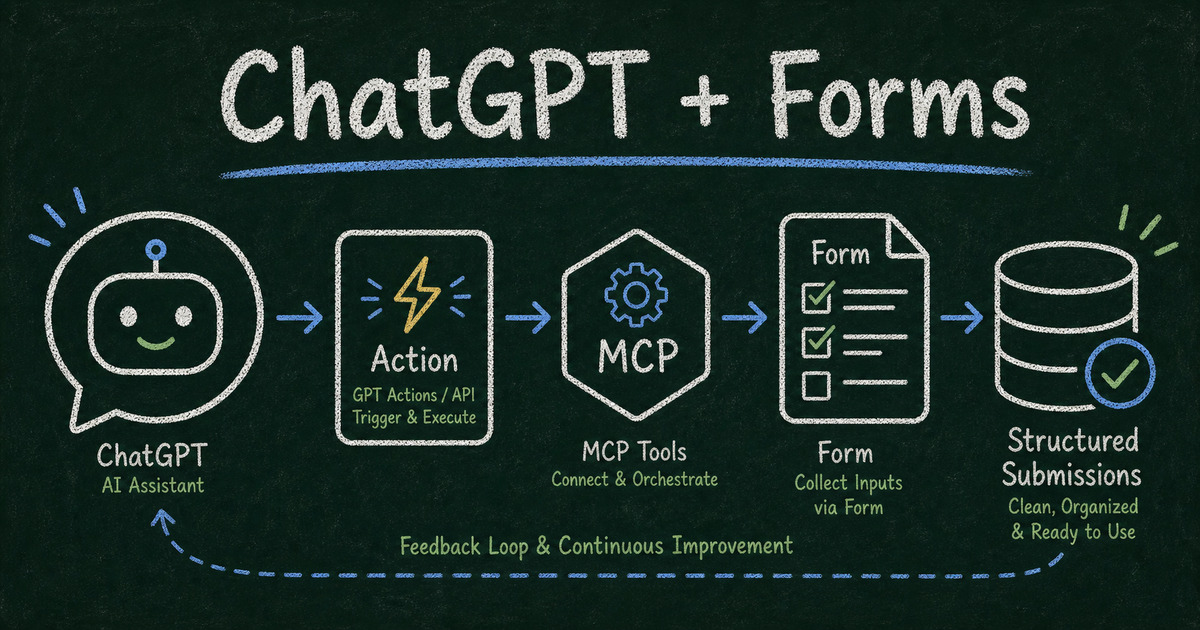
The answer is yes, but the implementation depends on what you mean by “ChatGPT.” A custom GPT with Actions is not the same thing as a ChatGPT app built with the Apps SDK. An MCP-connected AI agent is different again. They can all use forms, but they connect to outside tools in different ways.
This guide explains the practical options for using FormHug with ChatGPT Actions, GPT Apps, and AI agents. It also shows the cleanest workflow for turning a conversation into a shareable form and turning submissions back into structured data an assistant can use.
TL;DR - Use GPT Actions when a custom GPT needs to call a REST API, use ChatGPT Apps when you are building an app inside ChatGPT, and use FormHug MCP when an AI agent needs form creation and submission access.
- Actions are API calls - OpenAI describes GPT Actions as a way for Custom GPTs to interact with external applications through REST API calls.
- Apps SDK is app infrastructure - ChatGPT Apps are built around MCP servers, tools, resources, and optional UI components.
- Forms solve the human-input gap - people still need a reliable way to submit structured information.
- Works for: registrations, lead qualification, intake, surveys, applications, QA workflows, and internal tools.
- FormHug can act as the form layer between a person and an AI workflow.
What Are ChatGPT Actions and GPT Apps?
OpenAI’s GPT Actions documentation describes Actions as a way to customize ChatGPT with API integrations. In practice, a custom GPT uses an action schema and authentication settings to call an external API from natural language.
OpenAI’s Apps SDK is a different path. It is used to build apps that extend ChatGPT, with MCP tools, resources, and UI components. If you are building a product-like experience inside ChatGPT, Apps SDK is the more relevant model.
FormHug also supports the agent-native path through FormHug MCP. We built that MCP path because form creation and submission lookup are exactly the kind of structured tasks agents should handle without forcing people back into a dashboard.
Here is the simplest way to think about it:
| Path | Best for | FormHug role |
|---|---|---|
| GPT Actions | A custom GPT that calls an API | API-backed form creation or submission lookup |
| ChatGPT Apps / Apps SDK | A product experience inside ChatGPT | MCP server, tools, and form UI workflow |
| MCP agent workflow | Claude, Cursor, Codex, or other MCP-compatible agents | Native form backend for creation and responses |
If you only need a working form link, FormHug MCP is usually the shortest route. If you need a public ChatGPT app experience, start with the Apps SDK model.
Why Forms Matter in ChatGPT Workflows
AI assistants are good at conversation. Forms are good at collecting structured input from people who are not sitting inside the same chat.
That difference matters. If your GPT asks a client, patient, volunteer, or lead for information in a chat thread, the data is trapped in that thread. It is hard to validate, share, route, or review. A form gives the workflow a clean boundary:
| Workflow layer | What it does |
|---|---|
| ChatGPT | explains, asks, decides, summarizes |
| FormHug form | collects structured human input |
| Submission data | gives the agent reliable records to read |
| Downstream system | stores, routes, emails, scores, or exports |
This is the pattern behind AI agent workflows with a form layer: the assistant handles reasoning, while the form handles collection.
How to Use FormHug with ChatGPT Actions
If you are using Custom GPT Actions, the action generally needs an API surface. The GPT action schema tells ChatGPT which operations exist and what JSON input they require.
Step 1: Decide what the GPT should do
Do not start with “connect everything.” Start with one job:
- Create a form from a short description.
- Retrieve recent submissions from one form.
- Submit a test entry.
- Summarize entries that match a condition.
The narrower the action, the safer and easier it is to review.
Step 2: Define the form workflow
Write the workflow in plain language before writing schemas:
- The GPT asks what kind of form is needed.
- The GPT creates or selects the right FormHug form.
- The GPT returns the share link.
- People submit responses.
- The GPT reads the submissions and summarizes them.
That is already enough for many use cases: event registrations, customer intake, lead qualification, and team feedback.
Step 3: Keep authentication and permissions explicit
Any action that reads submissions should be treated as sensitive. Give the GPT access only to the forms it needs. Avoid broad account-level access if the workflow only requires one form.
For health, legal, financial, or HR workflows, do a privacy review before collecting sensitive information. A GPT can make the workflow faster, but it does not replace your compliance obligations.
Step 4: Return links, records, and summaries separately
Do not make the GPT mix three different jobs in one answer. A clean form workflow returns:
- the public form link for respondents;
- the submission records for authorized users;
- an AI-generated summary or next action.
That separation keeps the human-facing experience simple and keeps the AI-facing data reliable.
How to Use FormHug with ChatGPT Apps
If you are building a ChatGPT app, use the app model instead of trying to make Actions do everything. A form app usually needs tools for actions and resources for UI.
The practical architecture looks like this:
| Component | Purpose |
|---|---|
| MCP server | exposes form tools to ChatGPT |
| Tool: create form | turns a prompt into a FormHug form |
| Tool: list submissions | retrieves authorized entries |
| UI component | shows the form, entry list, or confirmation state |
| FormHug | stores forms, fields, and submissions |
That gives the user an app-like experience while preserving a structured form backend. If you are not building a full ChatGPT app, you may not need this much infrastructure.
Example Workflows
Client intake GPT
A consultant creates a custom GPT for onboarding new clients. The GPT asks what service the client needs, then creates a FormHug intake form with fields for goals, timeline, budget, and project background. The client fills it out outside ChatGPT. The GPT reads the submission before the kickoff call.
Useful starting point: Client Intake Form.
Volunteer coordination GPT
A nonprofit uses a GPT to collect volunteer availability for a weekend event. The GPT creates a short form, shares the link in email or Slack, then summarizes who is available by shift and role.
Pair this with the guidance in how to create an online application form.
Lead qualification GPT
A sales assistant creates a property inquiry, consultation request, or demo request form. Leads answer structured questions first. The GPT reads new submissions and flags high-intent prospects.
For the form-first version, see how to build a lead generation form.
Common Mistakes
Building a chat when you need a form
Use chat for guidance. Use forms for records. If the response needs validation, consent, routing, payment, or later review, it should probably be a form.
Letting the GPT read too much
A submission-reading action should have the smallest reasonable scope. Give it access to the relevant form, not your entire account.
Skipping the respondent experience
The person filling out the form may never see your GPT. Make the form clear on its own: title, description, required fields, consent copy, and confirmation message.
Frequently Asked Questions
Can ChatGPT create a FormHug form?
Yes. With FormHug MCP or an API-backed workflow, an AI agent can create a form from a natural language prompt and return a shareable link.
Are GPT Actions the same as ChatGPT Apps?
No. GPT Actions are API integrations for Custom GPTs. ChatGPT Apps are app experiences built with the Apps SDK, using MCP servers, tools, resources, and optional UI components.
Can ChatGPT read form submissions?
Yes, but only through an authorized integration. Treat submission access as sensitive, especially for personal, health, HR, legal, or financial data.
Can a GPT send a form link to someone outside ChatGPT?
Yes. The GPT can create or select a form, return the public link, and let the respondent complete it in a normal browser. The GPT or agent can then read the submission later if it has permission.
Do I need to build a full ChatGPT app?
Not always. If you only need an AI agent to create a form and read entries, FormHug MCP may be enough. Build a full app when you need a polished ChatGPT-native product experience.
Can I use FormHug with ChatGPT on the free plan?
FormHug’s MCP server is available on the free plan, so you can test agent-created forms and submission workflows before committing to a larger setup.
Related
- FormHug MCP Server: Create and Manage Forms with Claude, Cursor, or Any AI Agent — see what FormHug MCP can create, edit, and read from an agent workflow.
- MCP Form Builder: How AI Agents Can Create Forms Without a Dashboard — learn the MCP form-builder pattern behind agent-created forms.
- AI Agent Workflows Need a Form Layer — understand why forms are still useful when agents handle the rest of the workflow.
- Best AI Form Builder Tools in 2026 — compare AI form builders by generation, automation, and workflow fit.
FormHug gives AI workflows a practical place to collect human input. ChatGPT can reason, summarize, and decide; the form captures the structured record the workflow needs. Create your form →

Written by
FormHug TeamProduct, research, and form automation team
The FormHug Team brings together product builders, workflow researchers, and form automation practitioners who study how people collect, route, and act on information online. Our guides are based on hands-on product testing, template analysis, customer workflow patterns, and deep experience with forms, surveys, quizzes, AI-assisted creation, integrations, and results sharing.